Chroma Flux
A 3D twisted torus shader that reacts to hover, in your colors.
Overview
A 3D twisted torus shader that reacts to hover, in your colors.
- Interactive hover mode with smooth mouse tracking
- Auto-spin mode with customizable rotation speed
- Full color control (background and base tones)
- Adjustable twist, radius, thickness, and scale
- Customizable glow, bloom, and saturation
- Optional wobble animation effect
- Performance-optimized WebGL rendering
- Works in any section or layout
- Zero coding required
A twisted 3D torus shader for Framer
Chroma Flux renders a glowing, twisted ring whose surface flows with bands of shifting color. In Interactive mode it turns to follow the cursor with soft inertia; in Auto Spin it rotates on its own. Glow, bloom and saturation make it vivid, and the background is always transparent, so it drops into any layout as a centerpiece.
Twist, radius, thickness, scale, color, glow, bloom, saturation, hue shift, color frequency, noise, speed, wobble and a pixel-density cap are all set in Framer's properties panel.
Features
Interactive or auto-spin. Cursor following with inertia, or continuous rotation.
Geometry controls. Twist (0 to 10), radius, thickness and scale.
Color and light. Glow, bloom, saturation, hue shift, color frequency and grain.
Wobble. Optional organic movement on top of the rotation.
Transparent background. Layer it over any content.
Where Chroma Flux works best
Creative agency heroes. A large, highly saturated torus in Interactive mode to the side of a headline. Visitors who move the mouse see it respond, which feels crafted.
Music and event branding. Auto Spin with hue shift and wobble on gives a looping visual for a festival or album page, behind the lineup or release date.
Product loading screens. A small torus with low glow and slow Auto Spin keeps a wait pleasant.
Section accents. Reduce glow and bloom, set a muted base color, and use it as a quiet animated object between content blocks.
How to Use
Customization
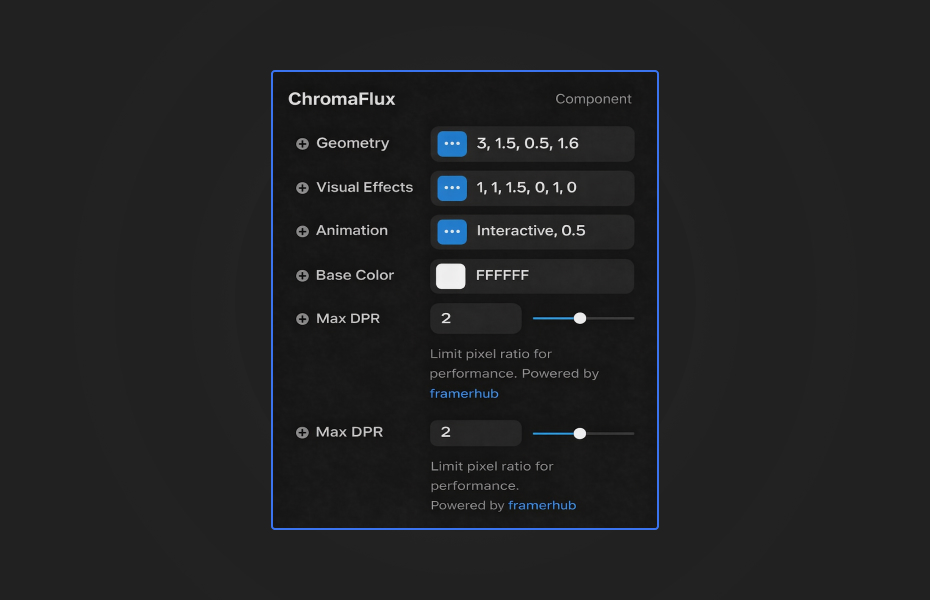
Geometry
- Twist: spiral intensity (0 to 10)
- Radius: torus size
- Thickness: tube thickness
- Scale: overall size
Visual effects
- Glow: light emission
- Bloom: post-processing bloom
- Saturation: color vibrancy
- Hue Shift: rotate the color spectrum
- Color Frequency: how many color bands
- Noise: grain texture
Animation
- Mode: Interactive (hover) or Auto Spin
- Speed: animation speed
- Wobble: organic movement on or off
Performance
- Max DPR: pixel density limit
Starting settings
Hero centerpiece. Interactive mode, twist 4, high saturation, medium glow and bloom.
Looping visual. Auto Spin, wobble on, slow speed, hue shift to your brand range.
Quiet accent. Auto Spin, low glow, low bloom, muted base color, small scale.
Performance and mobile
Set Max DPR to 1 on lower-end devices or mobile-heavy projects; it is the biggest saving. Glow and bloom add cost, so keep them low when the torus is a background. Because the background is transparent, let the section provide the color rather than the shader.
Compared with similar components
Liquid Chrome is a reflective liquid surface with several render modes, more material than object. Swirl Sphere is a sphere with swirling noise displacement. Quantum Nebula builds a torus from particles instead of a solid shader surface. Choose Chroma Flux when you want one vivid, solid-looking 3D shape.
How to install Chroma Flux in Framer
- Purchase Chroma Flux above
- Open your FramerHub dashboard
- Find Chroma Flux in Recent Purchases and click "Copy URL"
- Open your Framer project
- Paste it anywhere on the canvas (Cmd/Ctrl + V)
License
Single-use license: use it in one client project with full commercial rights. No redistribution. 1 license = 1 client.
Questions before buying? Read the refund policy or email hello@framerhub.io.
Chroma Flux FAQ
Does Chroma Flux have a transparent background?
Yes, always. You can place text over it or layer it on any section color or image.
What is the difference between the two animation modes?
Interactive mode makes the torus follow the cursor with smooth inertia. Auto Spin rotates it continuously at the speed you set, which suits backgrounds.
How do I make it run smoother on older devices?
Lower Max DPR to 1. It limits pixel density and is the quickest way to reduce GPU work.
How do I get different color palettes quickly?
Set a Base Color and use Hue Shift to rotate the spectrum. Color Frequency changes how many color bands run along the torus.
Chroma Flux - $9
A 3D twisted torus shader that reacts to hover, in your colors.

Trusted by agencies and freelancers
2,000+ Framer users rely on FramerHub plugins and components to build serious client sites.
"The Best Framer CMS Filtering Plugin I've Found — Truly a Game-Changer. I've tested a lot of Framer CMS filtering and sorting components — both free and paid — and this is by far the best one I've come across."
- Pierre Azalbert · CMS Filter
"Excellent product and super speedy and helpful support from the team!"
- Chloe Dovey · CMS Masonry Lightbox
"We had tried a couple of other Framer CMS filter components but they were buggy, hard to use and support was slow or non-existent. CMSFilter is easier to use and has a lot of added functionality."
- Mark Williamson · CMS Filter
"CMS Masonry-Lightbox is a super flexible and polished CMS grid that makes any portfolio shine. I especially love the support for local videos and the great customer support behind it."
- Rick van der Wal · CMS Masonry Lightbox
"I got a CMS featuring setup from Shahul Hameed, and it works perfectly. He was super helpful, guided me through everything, and even stayed up late to make sure I had no issues. Great experience overall!"
- Amarachi · CMS Filter
"Very happy with this purchase. Also the creators are very helpful, can only recommend."
- Petia Dimitrova · CMS Masonry Lightbox
"He really helped me out when I needed assistance adding it to my Framer project. Super fast customer support highly recommend!"
- Salman Abdulrazaq Ali
"Love the plugin, so glad you made it. … Thanks for building what Framer should have, you did a great job with it."
- Nathaniel DeSantis, Podcast Studio X · CMS Scheduler
"I updated the main CMS component in Framer and the bug is fixed now :) You are quick man! Love it."
- Marek · CMS Filter
"Amazing! This fixed the issue. Thanks so much for the help :)"
- Julie Elise Hauge · CMS Filter
Got questions? We've the answers
Got questions? We've the answers
Everything you need to know about FramerHub.