Chromatic Aberration
Apply customizable chromatic aberration effects to any content.
Overview
Apply customizable chromatic aberration effects to any content.
- Animated RGB channel separation
- Customizable offset and duration
- Full font customization with extended controls
- Independent channel color control
An animated chromatic aberration text effect for Framer
Chromatic Aberration splits a line of text into three colored copies that drift apart and back together, like a misaligned lens or a glitching screen. The copies blend where they overlap, so the text keeps a bright core with colored fringes. It is a quick way to give a headline a digital, edgy feel without turning it into an image.
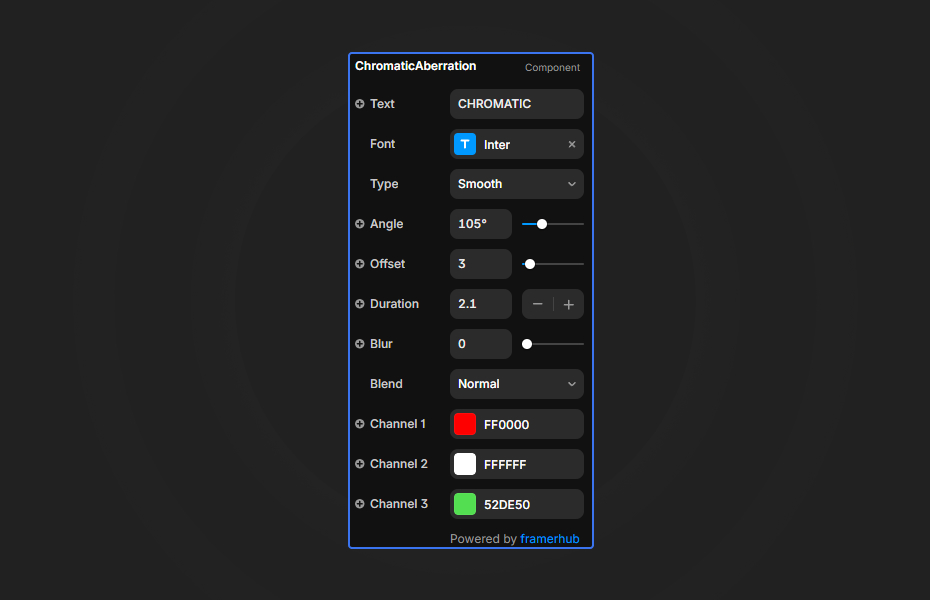
You type the text, style it with Framer's full font controls, and set the offset, animation duration and the three channel colors in the properties panel.
Features
Animated channel separation. Three color layers shift independently in a smooth loop.
Offset and duration. 0 to 50 pixels of separation, 0.1 to 10 seconds per cycle.
Full typography. Family, size, weight, alignment, line height and letter spacing.
Custom channel colors. Classic RGB or your own three colors.
Where Chromatic Aberration works best
Esports and gaming headlines. A heavy display font, offset 6, a 2-second cycle in classic RGB on black. It reads as "digital" before anyone reads the words.
Music festival and club nights. Use the lineup headliner or event name in brand colors with a slow 4-second cycle, so the text pulses like stage lighting.
Tech product launches. A short, bold product name with a small offset (2 to 3) adds energy to a launch page while staying readable.
Creative portfolios. Your name in the hero with custom channel colors makes the first screen feel designed, not templated.
How to Use
Customization
Content
- Text: your headline
- Font: family, size, weight, alignment and spacing
Animation
- Offset: channel separation (0 to 50px)
- Duration: cycle length (0.1 to 10 seconds)
Colors
- Channel 1 (default red)
- Channel 2 (default green)
- Channel 3 (default blue)
Starting settings
Readable. Offset 3, duration 3 seconds, RGB, bold sans-serif.
Glitchy. Offset 10, duration 0.8 seconds, RGB, condensed display font.
Brand glow. Offset 5, duration 4 seconds, three brand colors on a dark section.
Performance and mobile
The effect is lightweight. Readability is the real limit, so keep offsets between 2 and 10 for anything people need to read, and use larger values only for very short words. Use it on one headline per page so it keeps its impact.
Compared with similar components
Text Glitch adds RGB splitting plus periodic distortion bursts, so it feels more broken. Cipher Scramble decodes text from random characters. Motion Hover RGB applies an RGB split to images on hover. Choose Chromatic Aberration for a steady, looping color split on text.
How to install Chromatic Aberration in Framer
- Purchase Chromatic Aberration above
- Open your FramerHub dashboard
- Find Chromatic Aberration in Recent Purchases and click "Copy URL"
- Open your Framer project
- Paste it anywhere on the canvas (Cmd/Ctrl + V)
License
Single-use license: use it in one client project with full commercial rights. No redistribution. 1 license = 1 client.
Questions before buying? Read the refund policy or email hello@framerhub.io.
Chromatic Aberration FAQ
Can I use colors other than red, green and blue?
Yes. Each of the three channels has its own color, so you can use your brand palette or complementary colors instead of RGB.
How far should the channels separate?
An offset of 2 to 10 pixels keeps text readable. Higher values, up to 50, look more dramatic but are harder to read.
Why does the effect look static on the canvas?
The canvas shows a static offset preview. Open preview to see the animation.
Does it work on light backgrounds?
It works best on dark backgrounds, where the screen blend makes the colors glow. On light backgrounds, adjust the channel colors so they stay visible.
Chromatic Aberration - $9
Apply customizable chromatic aberration effects to any content.
Trusted by agencies and freelancers
2,000+ Framer users rely on FramerHub plugins and components to build serious client sites.
"The Best Framer CMS Filtering Plugin I've Found — Truly a Game-Changer. I've tested a lot of Framer CMS filtering and sorting components — both free and paid — and this is by far the best one I've come across."
- Pierre Azalbert · CMS Filter
"Excellent product and super speedy and helpful support from the team!"
- Chloe Dovey · CMS Masonry Lightbox
"We had tried a couple of other Framer CMS filter components but they were buggy, hard to use and support was slow or non-existent. CMSFilter is easier to use and has a lot of added functionality."
- Mark Williamson · CMS Filter
"CMS Masonry-Lightbox is a super flexible and polished CMS grid that makes any portfolio shine. I especially love the support for local videos and the great customer support behind it."
- Rick van der Wal · CMS Masonry Lightbox
"I got a CMS featuring setup from Shahul Hameed, and it works perfectly. He was super helpful, guided me through everything, and even stayed up late to make sure I had no issues. Great experience overall!"
- Amarachi · CMS Filter
"Very happy with this purchase. Also the creators are very helpful, can only recommend."
- Petia Dimitrova · CMS Masonry Lightbox
"He really helped me out when I needed assistance adding it to my Framer project. Super fast customer support highly recommend!"
- Salman Abdulrazaq Ali
"Love the plugin, so glad you made it. … Thanks for building what Framer should have, you did a great job with it."
- Nathaniel DeSantis, Podcast Studio X · CMS Scheduler
"I updated the main CMS component in Framer and the bug is fixed now :) You are quick man! Love it."
- Marek · CMS Filter
"Amazing! This fixed the issue. Thanks so much for the help :)"
- Julie Elise Hauge · CMS Filter
Got questions? We've the answers
Got questions? We've the answers
Everything you need to know about FramerHub.