---
title: "Exist Popup – Premium Framer Interactive Component | FramerHub"
canonical_url: "https://framerhub.io/components/exist-popup"
last_updated: "2026-11-09T16:24:42.786Z"
meta:
description: "Premium Framer Interactive Component. A popup that opens after a delay, on exit intent or after scrolling."
"og:description": "Premium Framer Interactive Component. A popup that opens after a delay, on exit intent or after scrolling."
"og:title": "Exist Popup – Premium Framer Interactive Component | FramerHub"
---
FramerHub home
[Interactive](https://framerhub.io/components/category/interactive) [Overlays](https://framerhub.io/components/category/backgrounds) [Scroll](https://framerhub.io/components/category/animations) [CMS](https://framerhub.io/components/category/cms-galleries)
# **Exist Popup **
A popup that opens after a delay, on exit intent or after scrolling.
[** Unlock All Components**](https://framerhub.io/components/all-access)
One-time payment
Lifetime updates
Commercial license
## **Overview** A popup that opens after a delay, on exit intent or after scrolling. - Three smart trigger modes (exit intent, scroll depth, timed) - Exit warning to prevent accidental tab closes - Optional auto-close with progress bar - Four smooth animations (fade, zoom, slide) - Center overlay or corner positioning - Fully customizable colors and styling - Drop in your own content with content slot - Works in any Framer project ## ExitPopup A popup that opens after a delay, when a visitor moves to leave the page, or after they scroll a set distance. You design the popup content as a normal Framer frame and connect it to the slot. Use it for announcements, newsletter signups, exit offers and promotions. ## Features**3 triggers.** After a time delay, on exit intent, or after scrolling a set distance.**Auto-close.** Close the popup after a set time, with an optional progress bar that pauses on hover.**Position.** A centered overlay with a backdrop, or any corner of the screen.**4 animations.** Fade, Zoom, Slide Up and Slide Down, at your chosen speed.**Your design.** Connect any Framer frame as the popup content. ## Use Cases**Newsletter signup.** A timed popup after visitors have read for a while.**Exit-intent offer.** A discount when visitors move to leave.**Announcements.** Updates in a corner that don't block the page.**Cookie notice.** An auto-closing corner popup with a progress bar.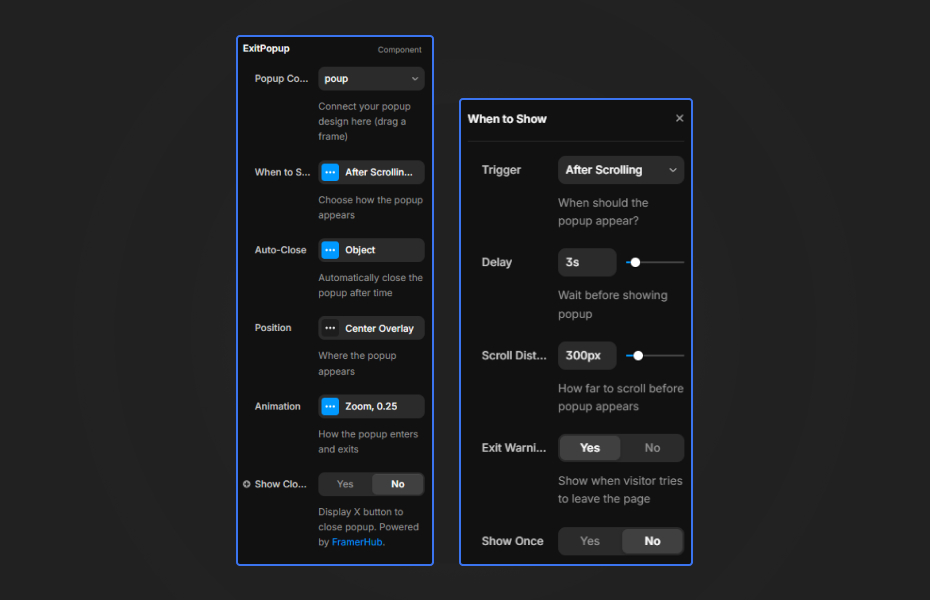 ## How to Use**Popup Content** Connect your popup design by dragging a frame into the slot.**When to Show (Trigger Settings)**- Trigger: After Time Delay, Exit Intent, or After Scrolling - Delay: Wait time before showing (0-30 seconds) - Exit Intent Sensitivity: Distance from top to trigger - Scroll Distance: How far to scroll before popup appears - Exit Warning: Show when visitor tries to leave the page**Auto-Close**- Enable: Close popup automatically after duration - Duration: Time before auto-close (1-60 seconds) - Progress Bar: Show countdown indicator - Bar Position: Top or Bottom - Bar Color: Customize progress color**Position**- Style: Center Overlay or Corner Position - Corner: Top Left, Top Right, Bottom Left, Bottom Right, Center - Edge Space: Distance from screen edges - Show Backdrop: Dark background behind popup - Backdrop Color: Overlay color**Animation**- Style: Fade, Zoom, Slide Up, Slide Down - Speed: Animation duration (0.1-2 seconds)**Close Button**- Show Close Button: Display X button - Hide if Auto-Close: Hide when using auto-close - Position: Inside or Outside popup - Distance: Spacing from corner - Size: Button size - Icon Size: X icon size - Icon Color: X icon color - Background: Button background color ### Quick Tips**Exit intent.** Works on desktop, where there's a cursor. A sensitivity of 10px triggers reliably as the cursor heads for the browser tabs.**Auto-close.** Show the progress bar so visitors know the popup will close. The timer pauses on hover.**Corners.** Use a corner for announcements that shouldn't interrupt. Bottom Right suits cookie notices.**Slot content.** Design the popup as its own frame first, then connect it. ---**Need help?** [Contact us](https://framerhub.io/contact). ## How to install Exist Popup in Framer 1. Purchase Exist Popup above 2. Open your [~~FramerHub dashboard~~](https://framerhub.io/dashboard) 3. Find Exist Popup in Recent Purchases and click "Copy URL" 4. Open your Framer project 5. Paste it anywhere on the canvas (Cmd/Ctrl + V) ## License Single-use license: use it in one client project with full commercial rights. No redistribution. 1 license = 1 client. Questions before buying? Read the [~~refund policy~~](https://framerhub.io/refund-policy) or email [~~hello@framerhub.io~~](mailto:hello@framerhub.io).**Popup****Modal****Exit Intent****Conversion****Lead Capture****Animation****Interaction**### **Exist Popup - $15** A popup that opens after a delay, on exit intent or after scrolling.**One-Time Payment****Lifetime Access****Unlimited sites**### **You might also like**[Browse all components ](https://framerhub.io/components) [**Interactive Particles**
Turns any image into a 3D particle field that reacts to mouse and touch.](https://framerhub.io/components/interactive-particles) [**Magnetic Buttons**
Buttons that pull toward your cursor.](https://framerhub.io/components/magnetic-buttons) [**Physics Tags**
Interactive 3D physics tags that react to gravity and collisions.](https://framerhub.io/components/physics-tags) ## **Trusted by agencies and freelancers** 2,000+ Framer users rely on FramerHub plugins and components to build serious client sites. -
> "The Best Framer CMS Filtering Plugin I've Found — Truly a Game-Changer. I've tested a lot of Framer CMS filtering and sorting components — both free and paid — and this is by far the best one I've come across."
**- Pierre Azalbert** · CMS Filter -
> "Excellent product and super speedy and helpful support from the team!"
**- Chloe Dovey** · CMS Masonry Lightbox -
> "We had tried a couple of other Framer CMS filter components but they were buggy, hard to use and support was slow or non-existent. CMSFilter is easier to use and has a lot of added functionality."
**- Mark Williamson** · CMS Filter -
> "CMS Masonry-Lightbox is a super flexible and polished CMS grid that makes any portfolio shine. I especially love the support for local videos and the great customer support behind it."
**- Rick van der Wal** · CMS Masonry Lightbox -
> "I got a CMS featuring setup from Shahul Hameed, and it works perfectly. He was super helpful, guided me through everything, and even stayed up late to make sure I had no issues. Great experience overall!"
**- Amarachi** · CMS Filter -
> "Very happy with this purchase. Also the creators are very helpful, can only recommend."
**- Petia Dimitrova** · CMS Masonry Lightbox -
> "He really helped me out when I needed assistance adding it to my Framer project. Super fast customer support highly recommend!"
**- Salman Abdulrazaq Ali**-
> "Love the plugin, so glad you made it. … Thanks for building what Framer should have, you did a great job with it."
**- Nathaniel DeSantis, Podcast Studio X** · CMS Scheduler -
> "I updated the main CMS component in Framer and the bug is fixed now :) You are quick man! Love it."
**- Marek** · CMS Filter -
> "Amazing! This fixed the issue. Thanks so much for the help :)"
**- Julie Elise Hauge** · CMS Filter -
> "The Best Framer CMS Filtering Plugin I've Found — Truly a Game-Changer. I've tested a lot of Framer CMS filtering and sorting components — both free and paid — and this is by far the best one I've come across."
**- Pierre Azalbert** · CMS Filter -
> "Excellent product and super speedy and helpful support from the team!"
**- Chloe Dovey** · CMS Masonry Lightbox -
> "We had tried a couple of other Framer CMS filter components but they were buggy, hard to use and support was slow or non-existent. CMSFilter is easier to use and has a lot of added functionality."
**- Mark Williamson** · CMS Filter -
> "CMS Masonry-Lightbox is a super flexible and polished CMS grid that makes any portfolio shine. I especially love the support for local videos and the great customer support behind it."
**- Rick van der Wal** · CMS Masonry Lightbox -
> "I got a CMS featuring setup from Shahul Hameed, and it works perfectly. He was super helpful, guided me through everything, and even stayed up late to make sure I had no issues. Great experience overall!"
**- Amarachi** · CMS Filter -
> "Very happy with this purchase. Also the creators are very helpful, can only recommend."
**- Petia Dimitrova** · CMS Masonry Lightbox -
> "He really helped me out when I needed assistance adding it to my Framer project. Super fast customer support highly recommend!"
**- Salman Abdulrazaq Ali**-
> "Love the plugin, so glad you made it. … Thanks for building what Framer should have, you did a great job with it."
**- Nathaniel DeSantis, Podcast Studio X** · CMS Scheduler -
> "I updated the main CMS component in Framer and the bug is fixed now :) You are quick man! Love it."
**- Marek** · CMS Filter -
> "Amazing! This fixed the issue. Thanks so much for the help :)"
**- Julie Elise Hauge** · CMS Filter Got questions? We've the answers ## **Got questions? We've the answers ** Everything you need to know about FramerHub.
## Sitemap
See the full [sitemap](/sitemap.md) for all pages.