Rain Overlay
Realistic rain effect for your Framer sites.
Overview
Realistic rain effect for your Framer sites.
- Customizable Rain Simulation
- 5 Unique Rain Styles
- Realistic Splash & Ripple Effects
- High Performance Canvas Rendering
Rain Overlay
Falling rain drawn on an HTML5 canvas, from a light drizzle to a heavy storm. Drops splash at the bottom of the frame, and you control the count, speed, wind and drop length.
Features
Weather controls. Drop count, fall speed, wind direction and drop length.
Splashes. Drops splash when they hit the bottom of the frame. "Realistic" mode adds expanding ripples.
5 styles.
- Lines: Classic rain streaks
- Dots: Stylized pixel-art or snow-like feel
- Mixed: A balanced combination
- Heavy: Thicker, more intense downpour
- Realistic: Gradient-filled drops with tear-drop shapes
Use Cases
Mood. Turn a static hero section into a rainy, moody one.
Weather and nature projects. A backdrop for weather apps, environmental dashboards and outdoor brands.
Storytelling. Rain that sets the tone of a scroll story.
How to Use
Customization
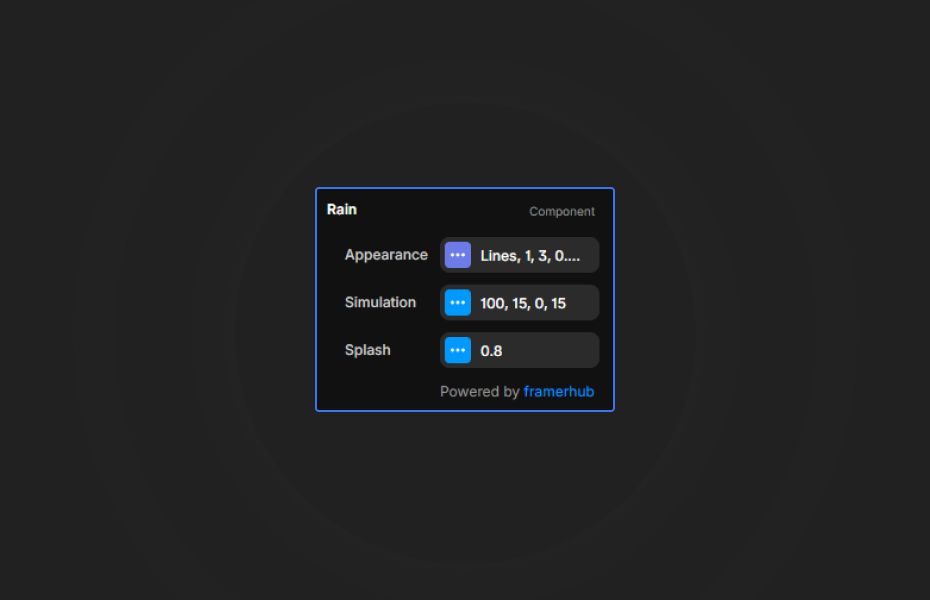
Simulation
- Count: Number of raindrops (20-500) for density control.
- Speed & Wind: Adjust vertical fall and horizontal drift.
- Length: Set the vertical streak length for motion blur effects.
Appearance
- Style: Select from 5 preset styles to match your design.
- Color: Set the primary rain color.
- Opacity Range: Randomize drop opacity for depth perception.
- Size Range: Randomize drop thickness for organic variation.
Splash
- Show Splash: Toggle bottom impact effects.
- Splash Size: Scale the splash particles.
Quick Tips
Phones. Keep the drop count under 150 to 200 on mobile so the animation stays smooth.
Depth. A low opacity range (0.3 to 0.6) and varied sizes add depth without pulling focus from your content.
Snow. The "Dots" style works as snow or floating particles when you slow it down and color it white.
How to install Rain Overlay in Framer
- Purchase Rain Overlay above
- Open your FramerHub dashboard
- Find Rain Overlay in Recent Purchases and click "Copy URL"
- Open your Framer project
- Paste it anywhere on the canvas (Cmd/Ctrl + V)
License
Single-use license: use it in one client project with full commercial rights. No redistribution. 1 license = 1 client.
Questions before buying? Read the refund policy or email hello@framerhub.io.
Rain Overlay - $9
Realistic rain effect for your Framer sites.



Trusted by agencies and freelancers
2,000+ Framer users rely on FramerHub plugins and components to build serious client sites.
"The Best Framer CMS Filtering Plugin I've Found — Truly a Game-Changer. I've tested a lot of Framer CMS filtering and sorting components — both free and paid — and this is by far the best one I've come across."
- Pierre Azalbert · CMS Filter
"Excellent product and super speedy and helpful support from the team!"
- Chloe Dovey · CMS Masonry Lightbox
"We had tried a couple of other Framer CMS filter components but they were buggy, hard to use and support was slow or non-existent. CMSFilter is easier to use and has a lot of added functionality."
- Mark Williamson · CMS Filter
"CMS Masonry-Lightbox is a super flexible and polished CMS grid that makes any portfolio shine. I especially love the support for local videos and the great customer support behind it."
- Rick van der Wal · CMS Masonry Lightbox
"I got a CMS featuring setup from Shahul Hameed, and it works perfectly. He was super helpful, guided me through everything, and even stayed up late to make sure I had no issues. Great experience overall!"
- Amarachi · CMS Filter
"Very happy with this purchase. Also the creators are very helpful, can only recommend."
- Petia Dimitrova · CMS Masonry Lightbox
"He really helped me out when I needed assistance adding it to my Framer project. Super fast customer support highly recommend!"
- Salman Abdulrazaq Ali
"Love the plugin, so glad you made it. … Thanks for building what Framer should have, you did a great job with it."
- Nathaniel DeSantis, Podcast Studio X · CMS Scheduler
"I updated the main CMS component in Framer and the bug is fixed now :) You are quick man! Love it."
- Marek · CMS Filter
"Amazing! This fixed the issue. Thanks so much for the help :)"
- Julie Elise Hauge · CMS Filter
Got questions? We've the answers
Got questions? We've the answers
Everything you need to know about FramerHub.