CMS Gallery Slider
Turns a CMS gallery into an animated slider with thumbnails and navigation.
Overview
Turns a CMS gallery into an animated slider with thumbnails and navigation.
- Works with CMS Gallery fields or standard image arrays
- Smooth animations with five transition styles (Slide, Fade, Scale, combinations)
- Four thumbnail positions (Top, Bottom, Left, Right) with auto-responsive behavior
- Customizable navigation arrows with hover effects
- Full control over thumbnail styling, spacing, and animations
- Auto-scroll to active thumbnail for seamless browsing
- Performance-optimized with smooth 60fps transitions
- No coding required
Gallery Slider for Framer
A gallery slider that reads images from a Framer CMS gallery field, or from images you add by hand. It shows one large image with a row of thumbnails, and you set the transitions, thumbnails and arrows in the properties panel.
Features
Two gallery modes. CMS mode connects to your CMS gallery field. Normal mode takes images you add yourself. One toggle switches between them.
Thumbnails on any side. Put thumbnails at the bottom, top, left or right. Side thumbnails move to the bottom on mobile, and the strip scrolls to keep the active thumbnail in view.
5 transitions. Slide, Fade, Scale, Slide+Scale or Slide+Fade, with your choice of speed and a horizontal or vertical direction.
Custom arrows. Set the arrow size, position, colors and hover state, or upload your own arrow icons.
Use Cases
Product pages. Several product photos with thumbnail previews.
Portfolios. Project images that visitors click through.
Real estate listings. Property photos pulled from each listing's CMS gallery.
Blog posts. An image gallery attached to a CMS article.
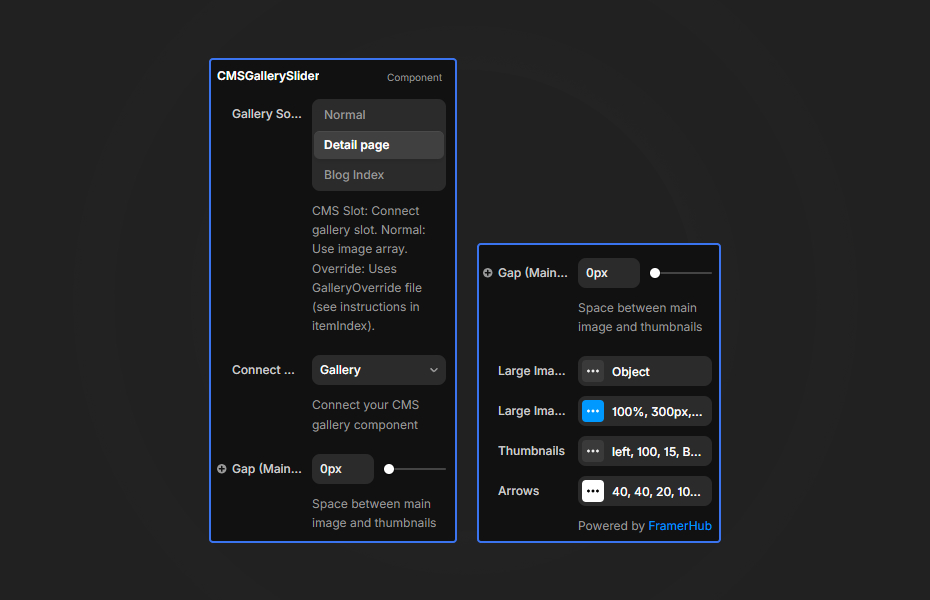
How to Use
Customization
Gallery Source
- Toggle between "CMS" and "Normal" modes
- For CMS: Connect your CMS Gallery component to the slot
- For Normal: Add images directly to the Gallery Images array
Large Image Settings
- Width/Height: Set dimensions (%, px, vh supported)
- Object Fit: Cover, Contain, Fill, None, Scale Down
- Border Radius: Round the image corners
- Animation: Speed, direction, and transition type
Thumbnail Settings
- Position: Bottom, Top, Left, Right
- Size & Gap: Control thumbnail dimensions
- Opacity: Active vs inactive states
- Animation: Scale, Lift, Glow, or Scale+Lift hover effects
- Border & Background: Full styling control
Arrow Controls
- Size, position, and border radius
- Colors for normal and hover states
- Upload custom arrow icons
Quick Tips
Responsive thumbnails. Left and right thumbnails move to the bottom on screens narrower than the breakpoint (768px by default).
CMS connection. In CMS mode, connect a CMS Gallery component to the slot. The main image becomes the first slide.
Image size. The component sizes images for display, but large source files still slow the page. Export them at the size you need.
Transition combos. Slide+Fade and Slide+Scale give the most movement between product shots.
How to install CMS Gallery Slider in Framer
- Purchase CMS Gallery Slider above
- Open your FramerHub dashboard
- Find CMS Gallery Slider in Recent Purchases and click "Copy URL"
- Open your Framer project
- Paste it anywhere on the canvas (Cmd/Ctrl + V)
License
Single-use license: use it in one client project with full commercial rights. No redistribution. 1 license = 1 client.
Questions before buying? Read the refund policy or email hello@framerhub.io.
CMS Gallery Slider - $14
Turns a CMS gallery into an animated slider with thumbnails and navigation.
You might also like



Trusted by agencies and freelancers
2,000+ Framer users rely on FramerHub plugins and components to build serious client sites.
"The Best Framer CMS Filtering Plugin I've Found — Truly a Game-Changer. I've tested a lot of Framer CMS filtering and sorting components — both free and paid — and this is by far the best one I've come across."
- Pierre Azalbert · CMS Filter
"Excellent product and super speedy and helpful support from the team!"
- Chloe Dovey · CMS Masonry Lightbox
"We had tried a couple of other Framer CMS filter components but they were buggy, hard to use and support was slow or non-existent. CMSFilter is easier to use and has a lot of added functionality."
- Mark Williamson · CMS Filter
"CMS Masonry-Lightbox is a super flexible and polished CMS grid that makes any portfolio shine. I especially love the support for local videos and the great customer support behind it."
- Rick van der Wal · CMS Masonry Lightbox
"I got a CMS featuring setup from Shahul Hameed, and it works perfectly. He was super helpful, guided me through everything, and even stayed up late to make sure I had no issues. Great experience overall!"
- Amarachi · CMS Filter
"Very happy with this purchase. Also the creators are very helpful, can only recommend."
- Petia Dimitrova · CMS Masonry Lightbox
"He really helped me out when I needed assistance adding it to my Framer project. Super fast customer support highly recommend!"
- Salman Abdulrazaq Ali
"Love the plugin, so glad you made it. … Thanks for building what Framer should have, you did a great job with it."
- Nathaniel DeSantis, Podcast Studio X · CMS Scheduler
"I updated the main CMS component in Framer and the bug is fixed now :) You are quick man! Love it."
- Marek · CMS Filter
"Amazing! This fixed the issue. Thanks so much for the help :)"
- Julie Elise Hauge · CMS Filter
Got questions? We've the answers
Got questions? We've the answers
Everything you need to know about FramerHub.