Letter Swap
Smooth letter-swapping hover effect with staggered animations.
Overview
Smooth letter-swapping hover effect with staggered animations.
- Staggered letter animation
- 2 Interaction Modes (One-shot, Hover)
- Customizable direction and timing
- Full font support
A letter-swap hover effect for Framer links and buttons
Letter Swap rolls each letter of a word out of view and a fresh copy into place when the visitor hovers, one letter after another, like the reels of a slot machine. The stagger gives it a wave-like motion, and spring physics make it feel physical. It is a small detail that makes navigation and buttons feel crafted.
You type the text, pick Forward or PingPong, choose the direction and stagger order, and set the spring and stagger timing in Framer's properties panel, with full font and color control.
Features
Staggered letters. Each character animates with a small delay for a wave effect.
Two modes. Forward (one-shot, resets instantly) and PingPong (reverses on mouse leave).
Direction. Letters roll up or down.
Stagger origin. First letter, last letter or center.
Spring physics. Spring duration from 0.1 to 2 seconds.
Where Letter Swap works best
Main navigation. Forward mode on each nav link, rolling up, default stagger. It adds personality without slowing anyone down.
Primary call-to-action buttons. PingPong mode inside a "Get started" button, so the label rolls on hover and back on leave.
Footer and social links. Small text with a quick stagger makes a long footer feel alive.
Portfolio project titles. Larger headings with Stagger From set to Center create an outward wave when visitors hover a project.
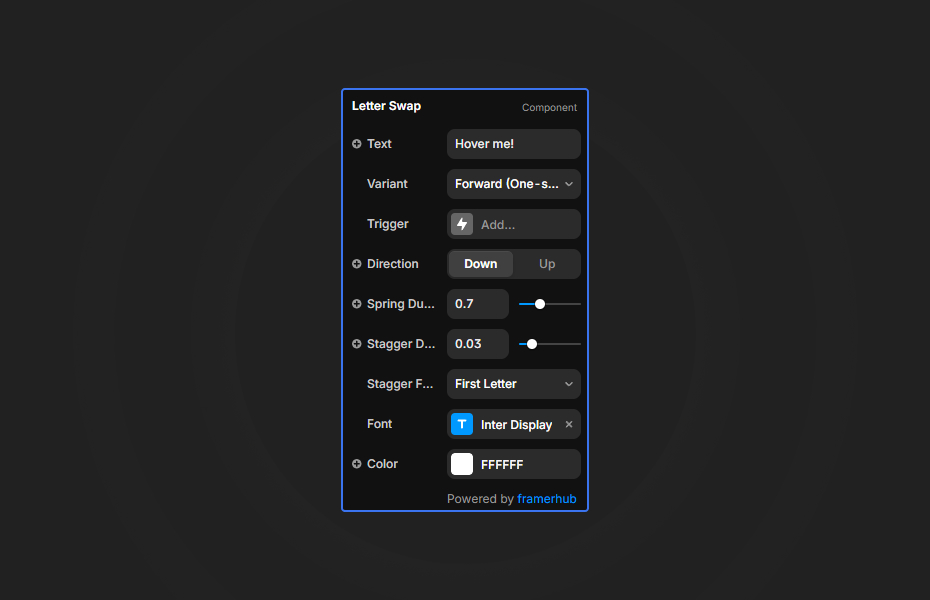
How to Use
Customization
Text and animation
- Text: your content
- Variant: Forward (one-shot) or PingPong (reverses on leave)
- Direction: up or down
Timing
- Spring Duration: bounciness (0.1 to 2.0 seconds)
- Stagger Duration: delay between letters
- Stagger From: first letter, last letter or center
Typography
- Font via Framer's extended font picker
- Text color
Starting settings
Nav link. Forward, up, stagger 0.03 seconds, spring 0.5.
Button. PingPong, up, stagger 0.03 seconds, spring 0.6.
Playful heading. PingPong, down, Stagger From center, spring 0.9.
Performance and mobile
Letter Swap animates text, so it is light. Hover does not exist on touch screens, so the text simply shows as normal there. Keep the stagger short (around 0.03 seconds) for interface elements; longer values feel like a typewriter and suit headings better.
Compared with similar components
Variable Font Hover changes each letter's weight on hover instead of swapping it. Cipher Scramble decodes text through random characters. Magnetic Buttons makes the whole button follow the cursor. Choose Letter Swap for a tidy, rolling hover on links and buttons.
How to install Letter Swap in Framer
- Purchase Letter Swap above
- Open your FramerHub dashboard
- Find Letter Swap in Recent Purchases and click "Copy URL"
- Open your Framer project
- Paste it anywhere on the canvas (Cmd/Ctrl + V)
License
Single-use license: use it in one client project with full commercial rights. No redistribution. 1 license = 1 client.
Questions before buying? Read the refund policy or email hello@framerhub.io.
Letter Swap FAQ
What is the difference between Forward and PingPong?
Forward plays the swap once on hover and resets instantly, which suits links. PingPong reverses the swap when the mouse leaves, which suits buttons.
Can the animation start from the middle of the word?
Yes. Set Stagger From to Center for a wave that spreads outward. First and Last letter are also available.
Can I use my own font?
Yes. Letter Swap uses Framer's extended font picker, so any font in your project works, along with your text color.
How bouncy should the spring be?
Spring values around 0.4 to 0.6 feel snappy and modern, and 0.8 to 1.0 add a playful bounce.
Letter Swap - $9
Smooth letter-swapping hover effect with staggered animations.

Trusted by agencies and freelancers
2,000+ Framer users rely on FramerHub plugins and components to build serious client sites.
"The Best Framer CMS Filtering Plugin I've Found — Truly a Game-Changer. I've tested a lot of Framer CMS filtering and sorting components — both free and paid — and this is by far the best one I've come across."
- Pierre Azalbert · CMS Filter
"Excellent product and super speedy and helpful support from the team!"
- Chloe Dovey · CMS Masonry Lightbox
"We had tried a couple of other Framer CMS filter components but they were buggy, hard to use and support was slow or non-existent. CMSFilter is easier to use and has a lot of added functionality."
- Mark Williamson · CMS Filter
"CMS Masonry-Lightbox is a super flexible and polished CMS grid that makes any portfolio shine. I especially love the support for local videos and the great customer support behind it."
- Rick van der Wal · CMS Masonry Lightbox
"I got a CMS featuring setup from Shahul Hameed, and it works perfectly. He was super helpful, guided me through everything, and even stayed up late to make sure I had no issues. Great experience overall!"
- Amarachi · CMS Filter
"Very happy with this purchase. Also the creators are very helpful, can only recommend."
- Petia Dimitrova · CMS Masonry Lightbox
"He really helped me out when I needed assistance adding it to my Framer project. Super fast customer support highly recommend!"
- Salman Abdulrazaq Ali
"Love the plugin, so glad you made it. … Thanks for building what Framer should have, you did a great job with it."
- Nathaniel DeSantis, Podcast Studio X · CMS Scheduler
"I updated the main CMS component in Framer and the bug is fixed now :) You are quick man! Love it."
- Marek · CMS Filter
"Amazing! This fixed the issue. Thanks so much for the help :)"
- Julie Elise Hauge · CMS Filter
Got questions? We've the answers
Got questions? We've the answers
Everything you need to know about FramerHub.