Variable Font Hover
A letter-by-letter variable font animation on hover.
Overview
A letter-by-letter variable font animation on hover.
- Letter-by-letter hover animation
- Variable font weight transitions
- Customizable stagger effects
- Optional slant axis support
- Hover or click toggle modes
A letter-by-letter variable font hover effect for Framer
Variable Font Hover makes each letter of a word grow bolder (and optionally lean) as the cursor passes over it, in a smooth wave that ripples through the text. Because it uses a variable font, the weight changes continuously rather than jumping between fixed styles. Space is reserved for the boldest weight, so the line never shakes or pushes other content around.
You set the default and hover weights, slant, speed, spring or ease timing, stagger direction and delay, colors and an optional background in Framer's properties panel. A click-to-toggle mode covers touch screens.
Features
Letter-by-letter animation. Each character animates on its own for a wave effect.
Weight and slant. Animate weight, and optionally the slant axis, between two states.
Stagger patterns. From the first letter, last letter, center or random.
Hover or toggle. Hover for desktop, click to toggle for mobile.
No layout shift. Reserved space keeps the text stable.
Accessible. Screen-reader text included; animated letters are aria-hidden.
Where Variable Font Hover works best
Editorial and type-led sites. Large section headings that thicken on hover suit magazines, type foundries and design studios that want typography to be the star.
Navigation menus. Nav items going from 400 to 700 with a 0.03-second stagger feel refined without any underline or color change.
Text-only calls to action. "Start a project" in a big display weight that ripples bolder on hover replaces a standard button.
Portfolio indexes. A list of project names, each one thickening as the cursor moves down the list, makes a simple index feel interactive.
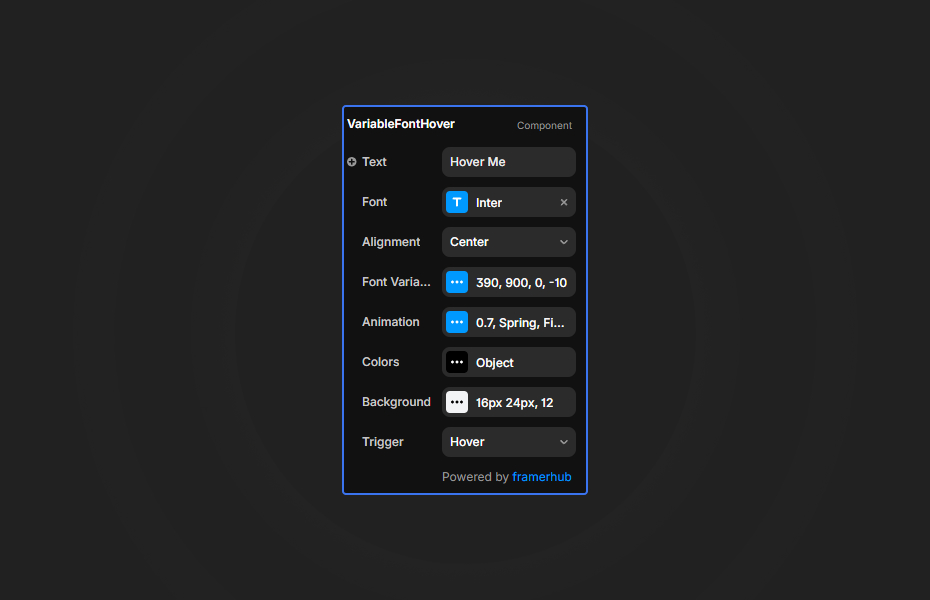
How to Use
Customization
Font variation
- Default and hover font weights
- Slant axis on or off
- Slant values for both states
Animation
- Transition speed
- Spring or ease timing
- Stagger direction and delay
Colors
- Default text color
- Optional color change on hover, with hover color
Background
- Optional background with color, padding and radius
Starting settings
Refined nav. Weights 400 to 700, ease timing, stagger 0.03 seconds from the first letter.
Bold heading. Weights 300 to 900, spring timing, stagger 0.05 seconds from the center.
Italic flourish. Weights 400 to 600 with slant on, stagger 0.08 seconds, hover color in your accent.
Performance and mobile
The effect is light. Use a weight range of at least 300 (for example 400 to 700, or 300 to 900); smaller ranges like 400 to 500 are hard to notice. On touch screens, switch to Click to Toggle so the effect is still reachable.
Compared with similar components
Text Pressure changes weight, width and style based on how close the cursor is, rather than on hover. Variable Font Rotate cycles words with weight transitions. Letter Swap rolls letters out and back in. Choose Variable Font Hover for an elegant weight wave on hover.
How to install Variable Font Hover in Framer
- Purchase Variable Font Hover above
- Open your FramerHub dashboard
- Find Variable Font Hover in Recent Purchases and click "Copy URL"
- Open your Framer project
- Paste it anywhere on the canvas (Cmd/Ctrl + V)
License
Single-use license: use it in one client project with full commercial rights. No redistribution. 1 license = 1 client.
Questions before buying? Read the refund policy or email hello@framerhub.io.
Variable Font Hover FAQ
Do I need a variable font?
Yes. The effect animates font weight (and optionally slant), so use a variable font that supports those axes.
Does it work on mobile?
Yes, with Click to Toggle mode. Hover mode is for desktop; toggle mode switches the effect on tap.
Will the text jump around when the weight changes?
No. The component reserves the space the text needs, so there is no layout shift even between very light and very bold weights.
Is the text accessible?
Yes. The component includes screen-reader text, and the animated letters are hidden from assistive technology.
Variable Font Hover - $9
A letter-by-letter variable font animation on hover.

Trusted by agencies and freelancers
2,000+ Framer users rely on FramerHub plugins and components to build serious client sites.
"The Best Framer CMS Filtering Plugin I've Found — Truly a Game-Changer. I've tested a lot of Framer CMS filtering and sorting components — both free and paid — and this is by far the best one I've come across."
- Pierre Azalbert · CMS Filter
"Excellent product and super speedy and helpful support from the team!"
- Chloe Dovey · CMS Masonry Lightbox
"We had tried a couple of other Framer CMS filter components but they were buggy, hard to use and support was slow or non-existent. CMSFilter is easier to use and has a lot of added functionality."
- Mark Williamson · CMS Filter
"CMS Masonry-Lightbox is a super flexible and polished CMS grid that makes any portfolio shine. I especially love the support for local videos and the great customer support behind it."
- Rick van der Wal · CMS Masonry Lightbox
"I got a CMS featuring setup from Shahul Hameed, and it works perfectly. He was super helpful, guided me through everything, and even stayed up late to make sure I had no issues. Great experience overall!"
- Amarachi · CMS Filter
"Very happy with this purchase. Also the creators are very helpful, can only recommend."
- Petia Dimitrova · CMS Masonry Lightbox
"He really helped me out when I needed assistance adding it to my Framer project. Super fast customer support highly recommend!"
- Salman Abdulrazaq Ali
"Love the plugin, so glad you made it. … Thanks for building what Framer should have, you did a great job with it."
- Nathaniel DeSantis, Podcast Studio X · CMS Scheduler
"I updated the main CMS component in Framer and the bug is fixed now :) You are quick man! Love it."
- Marek · CMS Filter
"Amazing! This fixed the issue. Thanks so much for the help :)"
- Julie Elise Hauge · CMS Filter
Got questions? We've the answers
Got questions? We've the answers
Everything you need to know about FramerHub.