Scroll 3D Grid
3D grid animations triggered by scroll.
Overview
3D grid animations triggered by scroll.
- 6 unique 3D animation styles
- GSAP-powered scroll animations
- Customizable grid layout
- Responsive design
- SSR-safe implementation
3D scroll animations for Framer image grids
Scroll 3D Grid lays your images out in a grid and animates them in 3D as the visitor scrolls. Rows slide in at an angle, tiles rotate and fade, zoom toward the camera, pop out or spin up, depending on which of the six styles you choose. The motion is scrubbed to scroll, so it moves exactly as fast as the reader does and reverses when they scroll back.
You set the columns, spacing, image ratio, depth, corner radius and how smoothly the animation follows scroll, all in Framer's properties panel. The animation runs on GSAP ScrollTrigger and is safe for server-side rendering.
Features
Six 3D styles. Perspective Slide, Rotation Fade, Zoom In, Pop Out, Row Slide and Spin Up.
Scroll-scrubbed motion. GSAP and ScrollTrigger tie the animation to the scroll position.
Flexible grid. 1 to 12 columns, adjustable spacing and image ratio.
Depth control. Set how strong the perspective is, from subtle to dramatic.
SSR-safe. Renders correctly on Framer's published pages.
Where Scroll 3D Grid works best
Portfolio work sections. Replace a static grid of project thumbnails with Perspective Slide at 3 columns. The work section becomes the moment visitors remember, and the images still link to case studies.
Product collections. Row Slide at 4 columns with square product shots turns a collection page into a showroom that unfolds as you scroll.
Photography and travel stories. Zoom In with portrait ratios (1.5) between paragraphs of a story gives each set of images a cinematic entrance.
Event recaps. Spin Up with 18 to 24 photos from the event makes a recap page feel as busy as the event was.
How to Use
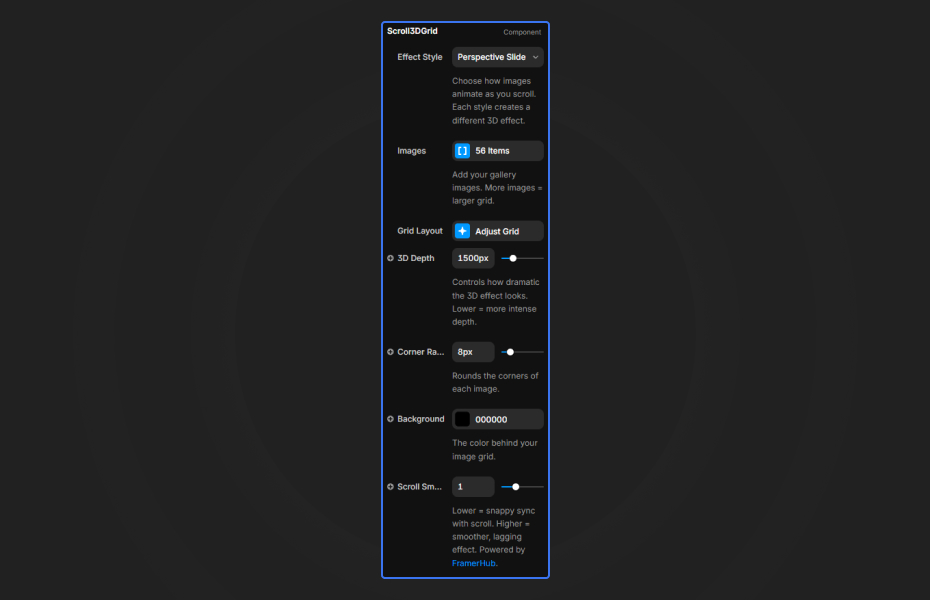
Customization
Effect style
- Six animation types, each with a different 3D transformation on scroll
Grid layout
- Columns: 1 to 12
- Spacing: gap between images
- Image Ratio: height to width (1 = square, 1.5 = portrait)
Appearance
- 3D Depth: perspective strength (lower values are more dramatic)
- Corner Radius: image corner rounding
- Background: color behind the grid
Scroll behavior
- Scroll Smoothness: lower is snappier, higher adds a smooth lag
Starting settings
Portfolio. Style 1 (Perspective Slide), 3 columns, ratio 1.25, depth around 1,000, medium smoothness.
Showroom. Style 5 (Row Slide), 4 columns, ratio 1, depth around 1,500.
Dramatic. Style 3 (Zoom In), 2 columns, depth 500, high smoothness for a slow, heavy feel.
Performance and mobile
Use 12 to 24 images and compress them, since every tile is transformed on each scroll frame. The component needs real scroll distance to play, so give it a tall frame and test in preview. On phones, fewer columns (1 or 2) and a higher depth value keep the effect readable on a narrow screen.
Compared with similar components
Scroll Image Reveal reveals a single image with an organic mask as you scroll, rather than animating a grid. Emerging Image uses WebGL for scroll-based image reveals. Infinite Gallery is an infinitely scrolling horizontal gallery with snapping and parallax. Choose Scroll 3D Grid when you have many images and want the scroll itself to be the animation.
Credits
Based on the Codrops 3D grid scroll animation, adapted for Framer.
How to install Scroll 3D Grid in Framer
- Purchase Scroll 3D Grid above
- Open your FramerHub dashboard
- Find Scroll 3D Grid in Recent Purchases and click "Copy URL"
- Open your Framer project
- Paste it anywhere on the canvas (Cmd/Ctrl + V)
License
Single-use license: use it in one client project with full commercial rights. No redistribution. 1 license = 1 client.
Questions before buying? Read the refund policy or email hello@framerhub.io.
Scroll 3D Grid FAQ
How many images should the grid have?
Between 12 and 24 images gives the effect enough material to look rich without slowing the page.
Why doesn't the animation play in my layout?
The animation is driven by scroll, so the component needs enough height and has to sit in a part of the page that actually scrolls. Give it a tall frame and check it in preview, not on the canvas.
How do I make the 3D effect stronger?
Lower the 3D Depth value. Values around 500 to 1,000 give dramatic perspective, and values above 2,000 are subtle.
Which animation style is best for a portfolio?
Perspective Slide (style 1) works well for portfolios. Row Slide (style 5) emphasizes horizontal movement, which suits wide product shots.
Scroll 3D Grid - $19
3D grid animations triggered by scroll.



Trusted by agencies and freelancers
2,000+ Framer users rely on FramerHub plugins and components to build serious client sites.
"The Best Framer CMS Filtering Plugin I've Found — Truly a Game-Changer. I've tested a lot of Framer CMS filtering and sorting components — both free and paid — and this is by far the best one I've come across."
- Pierre Azalbert · CMS Filter
"Excellent product and super speedy and helpful support from the team!"
- Chloe Dovey · CMS Masonry Lightbox
"We had tried a couple of other Framer CMS filter components but they were buggy, hard to use and support was slow or non-existent. CMSFilter is easier to use and has a lot of added functionality."
- Mark Williamson · CMS Filter
"CMS Masonry-Lightbox is a super flexible and polished CMS grid that makes any portfolio shine. I especially love the support for local videos and the great customer support behind it."
- Rick van der Wal · CMS Masonry Lightbox
"I got a CMS featuring setup from Shahul Hameed, and it works perfectly. He was super helpful, guided me through everything, and even stayed up late to make sure I had no issues. Great experience overall!"
- Amarachi · CMS Filter
"Very happy with this purchase. Also the creators are very helpful, can only recommend."
- Petia Dimitrova · CMS Masonry Lightbox
"He really helped me out when I needed assistance adding it to my Framer project. Super fast customer support highly recommend!"
- Salman Abdulrazaq Ali
"Love the plugin, so glad you made it. … Thanks for building what Framer should have, you did a great job with it."
- Nathaniel DeSantis, Podcast Studio X · CMS Scheduler
"I updated the main CMS component in Framer and the bug is fixed now :) You are quick man! Love it."
- Marek · CMS Filter
"Amazing! This fixed the issue. Thanks so much for the help :)"
- Julie Elise Hauge · CMS Filter
Got questions? We've the answers
Got questions? We've the answers
Everything you need to know about FramerHub.