Scroll Image Reveal
Scroll-triggered image reveals with an organic displacement effect.
Overview
Scroll-triggered image reveals with an organic displacement effect.
- Four reveal effects (Circle, Circle Morph, Circle Blur, Wave Path)
- Scroll-triggered animations with smooth scrubbing
- Full control over reveal timing and easing
- Customizable displacement and filter effects
- Optional transform animations (position, scale, rotation)
- Performance-optimized with GPU acceleration
- Works in any section or layout
- Zero coding required
Scroll-triggered image reveals for Framer
Scroll Image Reveal uncovers an image through an organic mask as the visitor scrolls. A circle grows, morphs, blurs or ripples across the frame until the full image shows, and the timing is tied to scroll position, so the reveal plays forward as people read and backward if they scroll up. It turns a single photo into a moment on the page.
You upload the image, pick one of four effects, and set the start and end points, easing, displacement, blur and optional movement in Framer's properties panel. The animation is GPU-accelerated and the image is lazy-loaded.
Features
Four reveal effects. Circle, Circle Morph, Circle Blur and Wave Path.
Timing control. Start and end scroll triggers, smoothness, a delay, and more than 30 easing curves.
Visual controls. Displacement intensity, blur amount, morphology and brightness.
Transforms. Optional start and end position, scale and rotation.
Fast loading. GPU-accelerated animation and lazy-loaded images.
Where Scroll Image Reveal works best
Case study openers. Put the project's key image right after the title and use Circle Morph. The reveal pulls readers into the story instead of showing everything at once.
Product photography. A Circle Blur reveal on a single product shot, with a short caption beside it, makes a premium product feel like it is being unveiled.
About and team pages. Reveal a team or founder photo with Wave Path as the visitor reaches the story section. It adds personality without a video.
Editorial and travel layouts. Alternate text blocks with full-width images that reveal on scroll, so long pages keep a rhythm.
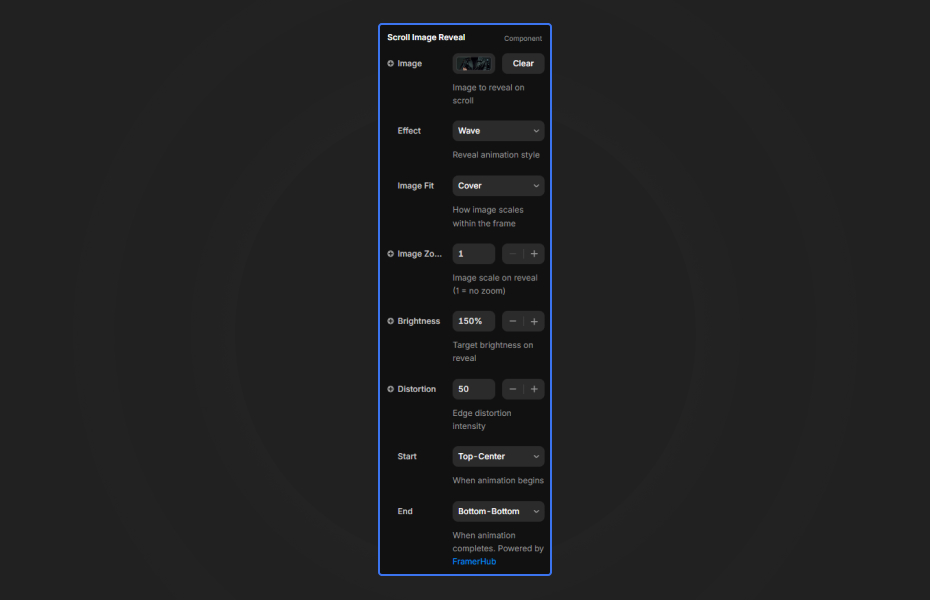
How to Use
Customization
Image and display
- Upload an image or paste an image URL
- Dimensions and object fit (cover, contain, fill)
Reveal effect
- Effect: Circle, Circle Morph, Circle Blur or Wave Path
- Final reveal size and displacement intensity
- Blur amount and morphology
Animation timing
- Start and end scroll triggers
- Smoothness (lower is smoother scrubbing)
- 30+ easing options
- Optional delay
Transform (optional)
- Starting position, scale and rotation
- Ending position, scale and rotation
Starting settings
Gentle. Circle, start trigger "top bottom", easing "none", no transforms. The image opens steadily as it moves up the screen.
Impact. Circle Morph, start trigger "center bottom", easing "power2.out", a small scale-up from 0.9 to 1.
Editorial. Wave Path, medium blur, a slight upward position shift, for full-width images between paragraphs.
Performance and mobile
The reveal is GPU-accelerated and the image loads lazily, so pages stay quick. Compress large photos before uploading, and raise the final reveal size for big images so the mask fully clears. On phones the scroll distance is shorter, so use an earlier start trigger to give the reveal enough room to play.
Compared with similar components
Emerging Image also reveals images on scroll, using WebGL effects. Scroll 3D Grid animates a whole grid of images in 3D instead of one. Before After Picture lets the visitor reveal one image over another by dragging. Choose Scroll Image Reveal when one important image deserves a cinematic entrance.
How to install Scroll Image Reveal in Framer
- Purchase Scroll Image Reveal above
- Open your FramerHub dashboard
- Find Scroll Image Reveal in Recent Purchases and click "Copy URL"
- Open your Framer project
- Paste it anywhere on the canvas (Cmd/Ctrl + V)
License
Single-use license: use it in one client project with full commercial rights. No redistribution. 1 license = 1 client.
Questions before buying? Read the refund policy or email hello@framerhub.io.
Scroll Image Reveal FAQ
Which reveal effects are included?
Four: Circle, Circle Morph, Circle Blur and Wave Path. Each uses a different organic mask to uncover the image as the visitor scrolls.
How do I control when the reveal starts?
Set the start and end scroll triggers. Starting early (top bottom) builds the reveal slowly, and starting later (center bottom) makes it more sudden.
Why doesn't my image reveal completely?
Larger images need a bigger final size. Raise the final reveal size (800 or more for large images) until the mask clears the whole frame.
Can I combine the reveal with movement?
Yes. The optional transform settings add a starting and ending position, scale and rotation, so the image can drift or turn while it is revealed.
Scroll Image Reveal - $12
Scroll-triggered image reveals with an organic displacement effect.


Trusted by agencies and freelancers
2,000+ Framer users rely on FramerHub plugins and components to build serious client sites.
"The Best Framer CMS Filtering Plugin I've Found — Truly a Game-Changer. I've tested a lot of Framer CMS filtering and sorting components — both free and paid — and this is by far the best one I've come across."
- Pierre Azalbert · CMS Filter
"Excellent product and super speedy and helpful support from the team!"
- Chloe Dovey · CMS Masonry Lightbox
"We had tried a couple of other Framer CMS filter components but they were buggy, hard to use and support was slow or non-existent. CMSFilter is easier to use and has a lot of added functionality."
- Mark Williamson · CMS Filter
"CMS Masonry-Lightbox is a super flexible and polished CMS grid that makes any portfolio shine. I especially love the support for local videos and the great customer support behind it."
- Rick van der Wal · CMS Masonry Lightbox
"I got a CMS featuring setup from Shahul Hameed, and it works perfectly. He was super helpful, guided me through everything, and even stayed up late to make sure I had no issues. Great experience overall!"
- Amarachi · CMS Filter
"Very happy with this purchase. Also the creators are very helpful, can only recommend."
- Petia Dimitrova · CMS Masonry Lightbox
"He really helped me out when I needed assistance adding it to my Framer project. Super fast customer support highly recommend!"
- Salman Abdulrazaq Ali
"Love the plugin, so glad you made it. … Thanks for building what Framer should have, you did a great job with it."
- Nathaniel DeSantis, Podcast Studio X · CMS Scheduler
"I updated the main CMS component in Framer and the bug is fixed now :) You are quick man! Love it."
- Marek · CMS Filter
"Amazing! This fixed the issue. Thanks so much for the help :)"
- Julie Elise Hauge · CMS Filter
Got questions? We've the answers
Got questions? We've the answers
Everything you need to know about FramerHub.