Soft Body Physics
Interactive soft body simulation with smooth metaball physics.
Overview
Interactive soft body simulation with smooth metaball physics.
- Raymarching Metaballs
- Interactive Physics (Follow/Repel)
- 4 3D Shapes (Sphere, Cube, Torus, Capsule)
- Advanced Material & Color Controls
Gooey 3D blobs that react to the cursor
Soft Body Physics renders three glossy 3D shapes that drift, wobble and melt into each other when they touch, like drops of liquid joining and pulling apart. It is drawn with raymarched metaballs, which is why the merging is perfectly smooth instead of two shapes overlapping. Visitors can make the blobs follow the cursor or scatter away from it.
You choose the shape, size, gooeyness, shininess, color mode, surface wobble, speed and cursor behavior in Framer's properties panel.
Features
Metaball rendering. Signed distance functions give smooth, liquid blending between objects.
Follow or repel. Two cursor behaviors for playful or clearing interactions.
Four shapes. Sphere, Cube, Torus and Capsule.
Materials. Shininess from matte clay (0) to glassy (1).
Wobble. Surface noise with its own strength, frequency and speed, so the objects look like they breathe.
Where Soft Body Physics works best
Playful brand heroes. Glossy spheres in Multi color mode with Follow on suit consumer apps, design studios and anything that wants to feel friendly.
Product launch teasers. Two-color Dual mode in brand colors, high smoothness, slow speed, behind a product name and a waitlist field.
Loading and empty states. A single color, low speed and gentle wobble make a waiting screen pleasant instead of empty.
Creative portfolios. Matte capsules in muted tones with Repel on give a homepage a tactile, sculptural feel.
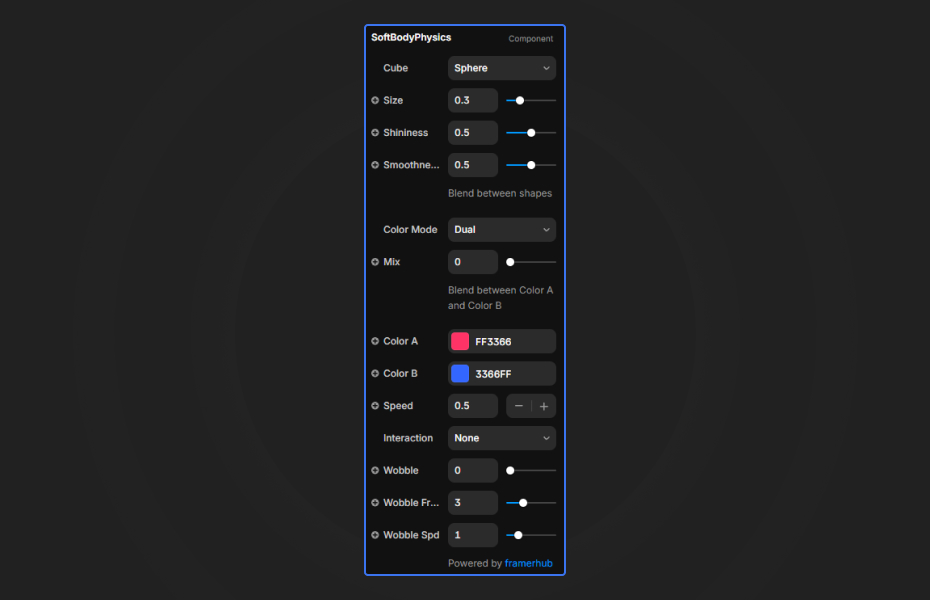
How to Use
Customization
Visual
- Shape: Sphere, Cube, Torus or Capsule
- Size and Radius: dimensions of the shape
- Smoothness: how gooey the objects are when they touch
- Shininess: 0 (matte) to 1 (glassy)
Colors
- Dual: gradient between two colors
- Solid: one flat color
- Multi: a different color for each of the 3 objects
Wobble
- Strength: surface distortion
- Frequency: scale of the noise
- Speed: how fast the surface ripples
Animation and interaction
- Speed: overall simulation speed
- Interaction: Follow or Repel the mouse
Starting settings
Candy. Spheres, Multi colors in bright pastels, shininess 0.8, high smoothness, Follow.
Clay. Capsules, Solid warm grey, shininess 0.1, low wobble, Repel.
Liquid metal. Torus, Dual silver and blue, shininess 1, medium wobble, slow speed.
Performance and mobile
Raymarching runs on the GPU, so use one Soft Body Physics component per screen and keep its frame no larger than it needs to be. Quality is reduced automatically on the Framer canvas; check the real look in preview. Phones have no hovering cursor, so expect the blobs to mostly drift on their own there.
Compared with similar components
Bouncing Balls is a 2D physics playground with gravity and collisions. Liquid Chrome is a reflective liquid surface rather than separate objects. Choose Soft Body Physics when you want a few large, glossy shapes that merge.
How to install Soft Body Physics in Framer
- Purchase Soft Body Physics above
- Open your FramerHub dashboard
- Find Soft Body Physics in Recent Purchases and click "Copy URL"
- Open your Framer project
- Paste it anywhere on the canvas (Cmd/Ctrl + V)
License
Single-use license: use it in one client project with full commercial rights. No redistribution. 1 license = 1 client.
Questions before buying? Read the refund policy or email hello@framerhub.io.
Soft Body Physics FAQ
What does the cursor do?
You choose. In Follow mode the blobs move toward the cursor, and in Repel mode they move away from it to clear a path.
Which shapes are available?
Sphere, Cube, Torus and Capsule. Smoothness controls how much they merge into each other when they touch.
Can each blob have its own color?
Yes. Multi color mode gives each of the three objects its own color. Dual mode blends two colors, and Solid uses one.
Why does it look lower quality on the Framer canvas?
The component reduces quality on the canvas to keep the editor responsive. It renders at full quality in preview and on the published site.
Soft Body Physics - $9
Interactive soft body simulation with smooth metaball physics.

Trusted by agencies and freelancers
2,000+ Framer users rely on FramerHub plugins and components to build serious client sites.
"The Best Framer CMS Filtering Plugin I've Found — Truly a Game-Changer. I've tested a lot of Framer CMS filtering and sorting components — both free and paid — and this is by far the best one I've come across."
- Pierre Azalbert · CMS Filter
"Excellent product and super speedy and helpful support from the team!"
- Chloe Dovey · CMS Masonry Lightbox
"We had tried a couple of other Framer CMS filter components but they were buggy, hard to use and support was slow or non-existent. CMSFilter is easier to use and has a lot of added functionality."
- Mark Williamson · CMS Filter
"CMS Masonry-Lightbox is a super flexible and polished CMS grid that makes any portfolio shine. I especially love the support for local videos and the great customer support behind it."
- Rick van der Wal · CMS Masonry Lightbox
"I got a CMS featuring setup from Shahul Hameed, and it works perfectly. He was super helpful, guided me through everything, and even stayed up late to make sure I had no issues. Great experience overall!"
- Amarachi · CMS Filter
"Very happy with this purchase. Also the creators are very helpful, can only recommend."
- Petia Dimitrova · CMS Masonry Lightbox
"He really helped me out when I needed assistance adding it to my Framer project. Super fast customer support highly recommend!"
- Salman Abdulrazaq Ali
"Love the plugin, so glad you made it. … Thanks for building what Framer should have, you did a great job with it."
- Nathaniel DeSantis, Podcast Studio X · CMS Scheduler
"I updated the main CMS component in Framer and the bug is fixed now :) You are quick man! Love it."
- Marek · CMS Filter
"Amazing! This fixed the issue. Thanks so much for the help :)"
- Julie Elise Hauge · CMS Filter
Got questions? We've the answers
Got questions? We've the answers
Everything you need to know about FramerHub.