Sprite Video ASCII
Turns video into live ASCII art with color grading, fit controls and retro scanlines.
Overview
Turns video into live ASCII art with color grading, fit controls and retro scanlines.
- Real-time video to ASCII conversion
- Upload and direct video URL source modes
- Brightness, contrast, and saturation controls
- Contain, cover, and stretch fit options
- True color mode with adjustable color boost
- Retro scanline overlay with opacity and spacing controls
- Playback and quality controls for performance tuning
Turn Video into ASCII Motion
Sprite Video ASCII renders a video as live ASCII art inside Framer. Use it for retro interfaces, hero sections, experimental portfolios or looping backgrounds.
Features
Live conversion. The video plays as animated ASCII art, and setting changes show up straight away.
Video sources. Upload a video to Framer, or link a direct .mp4, .webm, .ogg or .mov file from a host that allows cross-origin access.
Visual tuning. Density, character ramp, brightness, contrast, saturation, framing, colors and background.
True Color mode. Keeps the video's own colors in the ASCII output. Color Boost makes them stronger.
Scanlines. A CRT-style overlay with adjustable opacity and spacing.
Playback and quality. Speed, looping, autoplay and render quality.
Use Cases
Portfolio heroes. An animated ASCII landing section.
Retro interfaces. Terminal, cyberpunk and archival looks.
Looping backgrounds. Short clips turned into moving texture behind text.
Campaign pages. Music, fashion, editorial or event microsites.
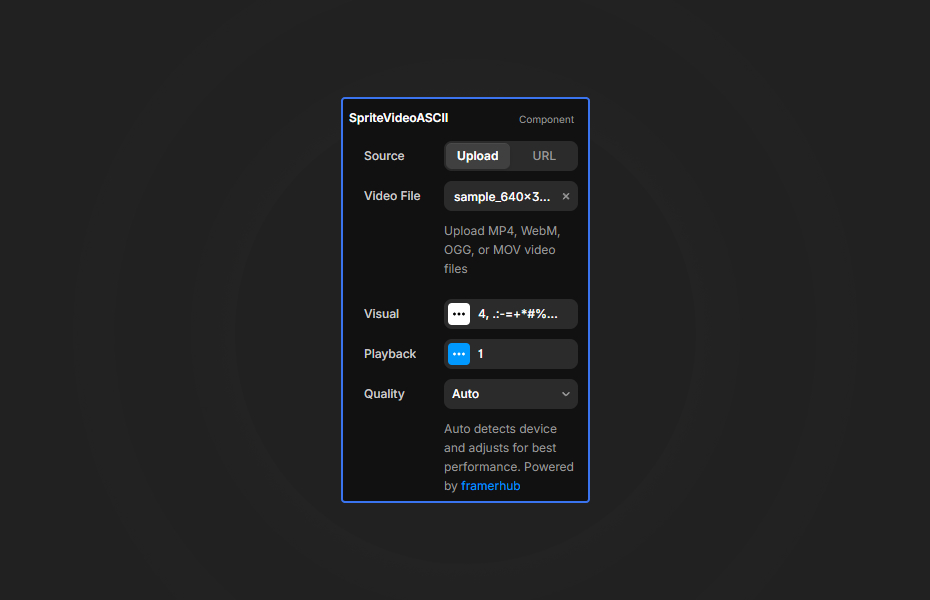
How to Use
Customization
Source Setup
- Use
Source > Uploadfor the most reliable workflow - Use
Source > URLonly with direct video file links - External video URLs must allow cross-origin access
- YouTube and Vimeo page or embed links are not supported for ASCII frame sampling
Visual Controls
- Density changes how fine or chunky the ASCII grid feels
- Characters lets you define your own tonal ramp
- Fit gives you
Contain,Cover, orStretch - Brightness, Contrast, and Saturation adjust the source before ASCII conversion
- True Color keeps sampled video color, while Color Boost increases intensity
- Scanlines can be styled further with Line Opacity and Line Spacing
Playback Controls
- Speed adjusts playback rate
- Loop repeats the video
- Autoplay starts motion automatically when the browser allows it
Quick Tips
Density. Start around 8-12 for a clear image that still runs smoothly.
Source. Uploaded files are the most reliable. In URL mode, use direct video files from a CDN with proper CORS headers.
Contrast. Videos with clear light and dark areas give the most readable ASCII.
Canvas editing. The Framer canvas can resize while you edit. If the framing looks wrong, change Fit or Quality to force a fresh calculation.
How to install Sprite Video ASCII in Framer
- Purchase Sprite Video ASCII above
- Open your FramerHub dashboard
- Find Sprite Video ASCII in Recent Purchases and click "Copy URL"
- Open your Framer project
- Paste it anywhere on the canvas (Cmd/Ctrl + V)
License
Single-use license: use it in one client project with full commercial rights. No redistribution. 1 license = 1 client.
Questions before buying? Read the refund policy or email hello@framerhub.io.
Sprite Video ASCII - $12
Turns video into live ASCII art with color grading, fit controls and retro scanlines.


Trusted by agencies and freelancers
2,000+ Framer users rely on FramerHub plugins and components to build serious client sites.
"The Best Framer CMS Filtering Plugin I've Found — Truly a Game-Changer. I've tested a lot of Framer CMS filtering and sorting components — both free and paid — and this is by far the best one I've come across."
- Pierre Azalbert · CMS Filter
"Excellent product and super speedy and helpful support from the team!"
- Chloe Dovey · CMS Masonry Lightbox
"We had tried a couple of other Framer CMS filter components but they were buggy, hard to use and support was slow or non-existent. CMSFilter is easier to use and has a lot of added functionality."
- Mark Williamson · CMS Filter
"CMS Masonry-Lightbox is a super flexible and polished CMS grid that makes any portfolio shine. I especially love the support for local videos and the great customer support behind it."
- Rick van der Wal · CMS Masonry Lightbox
"I got a CMS featuring setup from Shahul Hameed, and it works perfectly. He was super helpful, guided me through everything, and even stayed up late to make sure I had no issues. Great experience overall!"
- Amarachi · CMS Filter
"Very happy with this purchase. Also the creators are very helpful, can only recommend."
- Petia Dimitrova · CMS Masonry Lightbox
"He really helped me out when I needed assistance adding it to my Framer project. Super fast customer support highly recommend!"
- Salman Abdulrazaq Ali
"Love the plugin, so glad you made it. … Thanks for building what Framer should have, you did a great job with it."
- Nathaniel DeSantis, Podcast Studio X · CMS Scheduler
"I updated the main CMS component in Framer and the bug is fixed now :) You are quick man! Love it."
- Marek · CMS Filter
"Amazing! This fixed the issue. Thanks so much for the help :)"
- Julie Elise Hauge · CMS Filter
Got questions? We've the answers
Got questions? We've the answers
Everything you need to know about FramerHub.