The Digital Horizon
3D digital landscape with matrix-style particles and waves.
Overview
3D digital landscape with matrix-style particles and waves.
- 6 Character Sets (Binary, Hex, Glyphs, etc.)
- Interactive wave deformation
- Customizable grid density and spacing
- Bloom and color grading
- Transparent background option for layering
The Digital Horizon
An endless 3D landscape made of particles and code characters. The terrain rolls toward the camera in waves and ripples where the mouse moves.
Features
6 character sets. Dots, Circles, Squares, Binary, Hex and Glyphs, including Matrix-style code.
Waves and ripples. The terrain moves in a constant wave and ripples under the cursor.
Bloom and depth of field. Built-in glow and blur give the scene depth.
Use Cases
Hero backgrounds. A moving background for tech and sci-fi landing pages.
Presentation slides. A backdrop for slides about data, AI or cybersecurity.
Portfolios. A tech look for developer and designer portfolios.
Loading screens. Rolling waves while content loads.
How to Use
Customization
Grid Settings
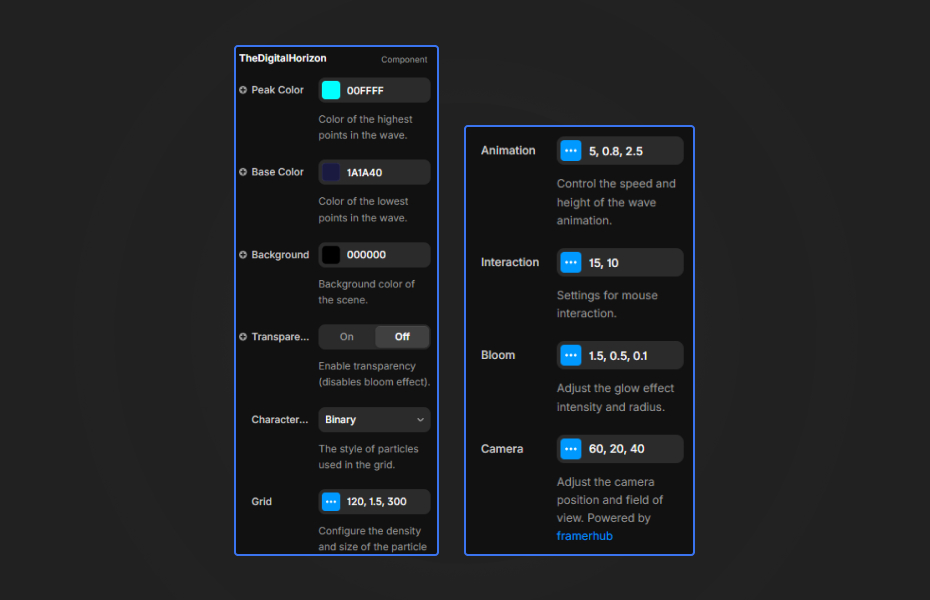
- Density: Control the number of particles (50-200). Higher density creates a more detailed landscape but may impact performance.
- Spacing: Adjust the distance between particles for a closer or more spread-out grid.
- Scale: Control the visual size of the particles. Larger scale makes them more prominent.
Animation Controls
- Scroll Speed: How fast the terrain moves toward you (0-20). Higher values create a faster-moving effect.
- Wave Speed: Controls the speed of the undulating wave motion.
- Wave Height: Adjust how tall the waves get.
- Pause: Toggle animation on/off for static screenshots or performance testing.
Colors
- Peak Color: The color at the highest points of the wave.
- Base Color: The color at the lowest points of the wave. Creates a gradient effect.
- Background: Scene background color. Works best with dark colors.
- Transparent BG: Toggle to enable transparent background for layering over other content (disables bloom effect).
Character Sets
- Choose from 6 particle styles: Dots, Circles, Squares, Binary, Hex, or Glyphs.
Bloom Effects
- Strength: Controls the intensity of the glow effect (0-3).
- Radius: How far the glow spreads.
- Threshold: Minimum brightness required to create bloom.
- Note: Bloom is disabled when Transparent BG is enabled.
Camera
- FOV: Field of view (30-120). Wider FOV shows more of the landscape.
- Height (Y): How high the camera is positioned above the grid.
- Distance (Z): How far back the camera is positioned.
Interaction
- Enabled: Toggle mouse interaction on/off.
- Radius: How large the ripple effect area is when hovering.
- Strength: How intense the mouse-based deformation is.
Quick Tips
Density. 80 to 120 runs smoothly on most devices. Drop to 60 to 80 on mobile.
Colors. A dark background (#020204 or deep blue) with bright peaks (#00ffff, #ff00ff). The gradient from peak to base color adds depth.
Character sets. Binary and Hex look like the Matrix. Dots and Circles are quieter.
Bloom. Raise the strength to 1.5 to 2.0 on dark backgrounds for a soft glow. Set it to 0 on light backgrounds for crisp particles.
Camera. A low camera (10 to 15) feels like flying over the terrain. A high one (25 to 35) gives a bird's-eye view.
Interaction. If the page feels slow, turn mouse interaction off or lower its radius and strength.
Transparent background. Turn on "Transparent BG" to layer the landscape over images, video or other content. Bloom is off in this mode.
How to install The Digital Horizon in Framer
- Purchase The Digital Horizon above
- Open your FramerHub dashboard
- Find The Digital Horizon in Recent Purchases and click "Copy URL"
- Open your Framer project
- Paste it anywhere on the canvas (Cmd/Ctrl + V)
License
Single-use license: use it in one client project with full commercial rights. No redistribution. 1 license = 1 client.
Questions before buying? Read the refund policy or email hello@framerhub.io.
The Digital Horizon - $12
3D digital landscape with matrix-style particles and waves.
Trusted by agencies and freelancers
2,000+ Framer users rely on FramerHub plugins and components to build serious client sites.
"The Best Framer CMS Filtering Plugin I've Found — Truly a Game-Changer. I've tested a lot of Framer CMS filtering and sorting components — both free and paid — and this is by far the best one I've come across."
- Pierre Azalbert · CMS Filter
"Excellent product and super speedy and helpful support from the team!"
- Chloe Dovey · CMS Masonry Lightbox
"We had tried a couple of other Framer CMS filter components but they were buggy, hard to use and support was slow or non-existent. CMSFilter is easier to use and has a lot of added functionality."
- Mark Williamson · CMS Filter
"CMS Masonry-Lightbox is a super flexible and polished CMS grid that makes any portfolio shine. I especially love the support for local videos and the great customer support behind it."
- Rick van der Wal · CMS Masonry Lightbox
"I got a CMS featuring setup from Shahul Hameed, and it works perfectly. He was super helpful, guided me through everything, and even stayed up late to make sure I had no issues. Great experience overall!"
- Amarachi · CMS Filter
"Very happy with this purchase. Also the creators are very helpful, can only recommend."
- Petia Dimitrova · CMS Masonry Lightbox
"He really helped me out when I needed assistance adding it to my Framer project. Super fast customer support highly recommend!"
- Salman Abdulrazaq Ali
"Love the plugin, so glad you made it. … Thanks for building what Framer should have, you did a great job with it."
- Nathaniel DeSantis, Podcast Studio X · CMS Scheduler
"I updated the main CMS component in Framer and the bug is fixed now :) You are quick man! Love it."
- Marek · CMS Filter
"Amazing! This fixed the issue. Thanks so much for the help :)"
- Julie Elise Hauge · CMS Filter
Got questions? We've the answers
Got questions? We've the answers
Everything you need to know about FramerHub.