Credit Card 3D Tilt
A 3D credit card that tilts, with holographic glare and a frosted-glass finish.
Overview
A 3D credit card that tilts, with holographic glare and a frosted-glass finish.
- Interactive 3D tilt on mouse hover
- Holographic rainbow shimmer effect
- Glassmorphism overlay with noise texture
- Contactless payment icon
- Custom card network logo support
- Fully customizable colors and imagery
An interactive 3D credit card for fintech pages
Credit Card 3D Tilt is a realistic payment card that tilts in 3D as the cursor moves over it. A holographic rainbow shimmer and a glare follow the cursor across the surface, and a frosted-glass finish with a fine noise texture makes it look like a premium card rather than a flat illustration. Card number, name, expiry, network logo and contactless icon are all editable.
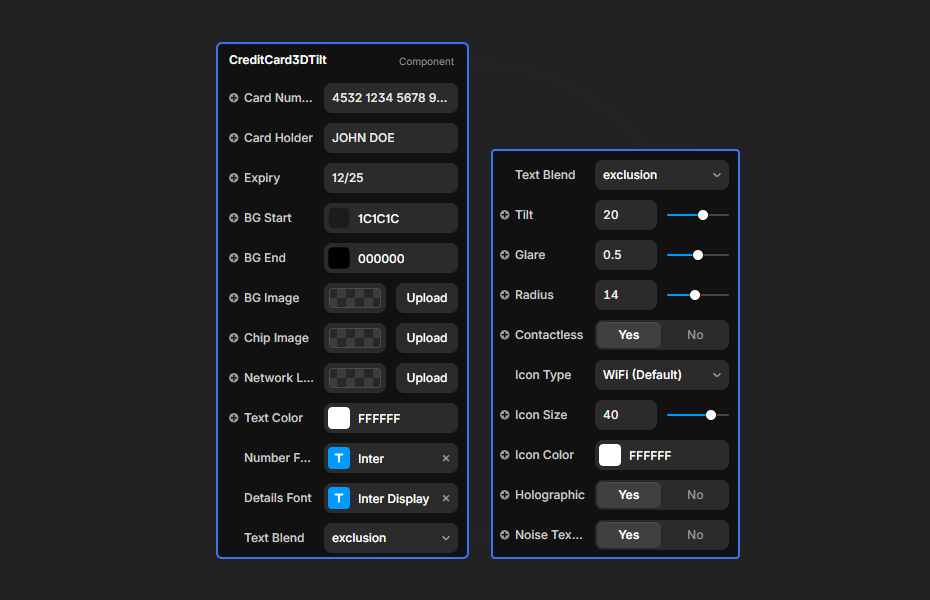
You set the text, gradient or background image, logo, glare, shimmer, noise and tilt strength in Framer's properties panel.
Features
3D tilt. Smooth tilt toward the cursor, from 5 to 30 degrees.
Holographic shimmer. A rainbow gradient that moves with the cursor, like the security foil on real cards.
Glassmorphism. Frosted glass and a noise overlay for a premium surface.
Contactless icon. Can be shown or hidden.
Network logo. Upload Visa, Mastercard or your own mark, or use the default circles.
Where Credit Card 3D Tilt works best
Card and banking product launches. Put the card at the right of a hero headline like "The card that pays you back", using your real card design as the background image. Visitors can "hold" the card before they apply.
Fintech feature sections. Next to a list of benefits (cashback, virtual cards, instant freeze), the tilting card gives the section a focal point that is on-topic.
Checkout and pricing pages. A small card beside a payment form adds a touch of polish. Use placeholder details so nobody mistakes it for a real card.
Membership and loyalty programs. Restyle it as a member card with the program's colors and the member tier as the holder name.
How to Use
Customization
Card details
- Card number, holder name and expiry date (all editable text)
Visual styling
- Gradient start and end colors
- Custom background image for branded cards
- Text color and blend modes
- Border radius
Effects
- Holographic shimmer on or off
- Glare intensity (0 to 100%)
- Noise texture on or off
- Tilt strength (5 to 30 degrees)
Starting settings
Premium dark. Default dark gradient, shimmer on, glare around 40%, noise on, tilt 15 degrees.
Light brand card. Light gradient colors with dark text, shimmer on, glare around 25%, tilt 10 degrees.
Real card mockup. Your card artwork as the background image, matching logo, shimmer off, tilt 10 degrees for a calm, realistic feel.
Performance and mobile
The card is light, but the holographic layer is the most expensive part, so turn it off for projects with mostly mobile visitors. The tilt is mouse-driven, so phone visitors mostly see the card at rest. For light mode, use lighter gradient colors with dark text.
Compared with similar components
Magnetic Buttons and Counter Number are other small interactive details for fintech and SaaS pages. Liquid Chrome gives a reflective metallic surface if you want a material effect instead of an object. Choose Credit Card 3D Tilt when the product itself is a card.
How to install Credit Card 3D Tilt in Framer
- Purchase Credit Card 3D Tilt above
- Open your FramerHub dashboard
- Find Credit Card 3D Tilt in Recent Purchases and click "Copy URL"
- Open your Framer project
- Paste it anywhere on the canvas (Cmd/Ctrl + V)
License
Single-use license: use it in one client project with full commercial rights. No redistribution. 1 license = 1 client.
Questions before buying? Read the refund policy or email hello@framerhub.io.
Credit Card 3D Tilt FAQ
Can I use my own card design?
Yes. Upload a background image for a branded card, set your own gradient colors, and upload a Visa, Mastercard or custom network logo.
Are the card number and name editable?
Yes. Card number, holder name and expiry date are text properties, so you can show a realistic format or placeholder text for a demo.
How strong should the tilt be?
The default is 15 degrees. 5 to 10 degrees feels subtle and elegant, and 20 to 30 degrees is more dramatic.
Does the tilt work on phones?
The tilt is driven by the mouse, so phone visitors mostly see the card at rest, which still looks finished. Turning off the holographic effect on mobile-heavy projects keeps things smooth.
Credit Card 3D Tilt - $9
A 3D credit card that tilts, with holographic glare and a frosted-glass finish.

Trusted by agencies and freelancers
2,000+ Framer users rely on FramerHub plugins and components to build serious client sites.
"The Best Framer CMS Filtering Plugin I've Found — Truly a Game-Changer. I've tested a lot of Framer CMS filtering and sorting components — both free and paid — and this is by far the best one I've come across."
- Pierre Azalbert · CMS Filter
"Excellent product and super speedy and helpful support from the team!"
- Chloe Dovey · CMS Masonry Lightbox
"We had tried a couple of other Framer CMS filter components but they were buggy, hard to use and support was slow or non-existent. CMSFilter is easier to use and has a lot of added functionality."
- Mark Williamson · CMS Filter
"CMS Masonry-Lightbox is a super flexible and polished CMS grid that makes any portfolio shine. I especially love the support for local videos and the great customer support behind it."
- Rick van der Wal · CMS Masonry Lightbox
"I got a CMS featuring setup from Shahul Hameed, and it works perfectly. He was super helpful, guided me through everything, and even stayed up late to make sure I had no issues. Great experience overall!"
- Amarachi · CMS Filter
"Very happy with this purchase. Also the creators are very helpful, can only recommend."
- Petia Dimitrova · CMS Masonry Lightbox
"He really helped me out when I needed assistance adding it to my Framer project. Super fast customer support highly recommend!"
- Salman Abdulrazaq Ali
"Love the plugin, so glad you made it. … Thanks for building what Framer should have, you did a great job with it."
- Nathaniel DeSantis, Podcast Studio X · CMS Scheduler
"I updated the main CMS component in Framer and the bug is fixed now :) You are quick man! Love it."
- Marek · CMS Filter
"Amazing! This fixed the issue. Thanks so much for the help :)"
- Julie Elise Hauge · CMS Filter
Got questions? We've the answers
Got questions? We've the answers
Everything you need to know about FramerHub.