Counter Number
Animated number counter with custom formatting and easing.
Overview
Animated number counter with custom formatting and easing.
- Smooth counting animation
- Custom prefixes, suffixes, separators
- Auto-start or scroll trigger
- Responsive sizing
An animated number counter for Framer
Counter Number counts from a start value to an end value with smooth easing, the way key figures animate on well-made landing pages. You format the number with a prefix, suffix, decimals and thousands separator, and choose whether it starts as soon as the page appears or only when the visitor scrolls to it.
Start and end values, trigger, duration, decimals, separator, color, prefix, suffix and text decoration are all in Framer's properties panel, with full font styling.
Features
Smooth counting. Linear or eased animation from start to end.
Formatting. Prefix, suffix, 0 to 3 decimals and thousands separators.
Triggers. Layer in View (on scroll) or On Appear.
Duration. 0.1 to 10 seconds.
Typography. Full font control, color and underline or strikethrough.
Where Counter Number works best
Social proof sections. A row of three counters (users, countries, years) under the hero, triggered in view, makes numbers feel earned rather than stated. Use your real figures.
Pricing and savings. Show a monthly price counting up, or a "you save $240" figure, in a pricing section. A strikethrough decoration on an old price works well next to it.
Impact and nonprofit reports. Meals served, trees planted or volunteers counted, with a suffix like "+", give an impact page momentum as people scroll.
Case studies. Results like "+38%" or "2.4x" counting up next to the story of how the result was achieved.
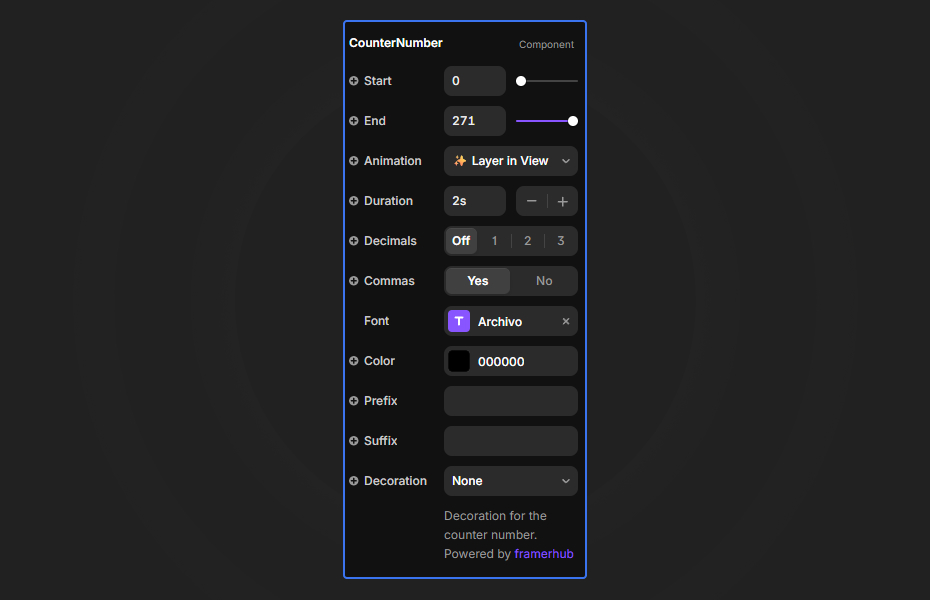
How to Use
Customization
Counter settings
- Start: number to count from
- End: number to count to
- Animation: Layer in View or On Appear
- Duration: 0.1 to 10 seconds
Formatting and style
- Decimals: 0 to 3
- Commas: thousands separator on or off
- Color
- Prefix and suffix
- Decoration: underline or strikethrough
Starting settings
Stat row. Start 0, Layer in View, 2 seconds, commas on, suffix "+", bold display font.
Percentage. Start 0, end at your figure, 1.5 seconds, 1 decimal, suffix "%".
Price. Prefix "$", 0 decimals, 1 second, On Appear inside the pricing card.
Performance and mobile
The counter is light. Use Layer in View so it only animates when someone can see it, which also means the animation is not over before they scroll down. Large, bold numbers with a short label underneath read best on phones.
Compared with similar components
Infinite Scrolling Ticker scrolls text or logos in a marquee. Text Rotate rotates words in a headline. Scratch & Win Coupon reveals an offer interactively. Choose Counter Number for animated figures and stats.
How to install Counter Number in Framer
- Purchase Counter Number above
- Open your FramerHub dashboard
- Find Counter Number in Recent Purchases and click "Copy URL"
- Open your Framer project
- Paste it anywhere on the canvas (Cmd/Ctrl + V)
License
Single-use license: use it in one client project with full commercial rights. No redistribution. 1 license = 1 client.
Questions before buying? Read the refund policy or email hello@framerhub.io.
Counter Number FAQ
Can the counter start when it scrolls into view?
Yes. Set Animation to Layer in View and it starts when visitors reach it. On Appear starts it as soon as the page loads.
Can I show currency, percentages or units?
Yes. Add a prefix such as "$" and a suffix such as "%", "M+" or "kg", choose 0 to 3 decimals, and turn the thousands separator on or off.
How long should the count take?
Anything from 0.1 to 10 seconds. One to three seconds feels natural for most stats.
Can I style the number to match my site?
Yes. The counter uses Framer's font controls and a color setting, and you can add an underline or strikethrough, for example on an old price.
Counter Number - $14
Animated number counter with custom formatting and easing.
You might also like


Trusted by agencies and freelancers
2,000+ Framer users rely on FramerHub plugins and components to build serious client sites.
"The Best Framer CMS Filtering Plugin I've Found — Truly a Game-Changer. I've tested a lot of Framer CMS filtering and sorting components — both free and paid — and this is by far the best one I've come across."
- Pierre Azalbert · CMS Filter
"Excellent product and super speedy and helpful support from the team!"
- Chloe Dovey · CMS Masonry Lightbox
"We had tried a couple of other Framer CMS filter components but they were buggy, hard to use and support was slow or non-existent. CMSFilter is easier to use and has a lot of added functionality."
- Mark Williamson · CMS Filter
"CMS Masonry-Lightbox is a super flexible and polished CMS grid that makes any portfolio shine. I especially love the support for local videos and the great customer support behind it."
- Rick van der Wal · CMS Masonry Lightbox
"I got a CMS featuring setup from Shahul Hameed, and it works perfectly. He was super helpful, guided me through everything, and even stayed up late to make sure I had no issues. Great experience overall!"
- Amarachi · CMS Filter
"Very happy with this purchase. Also the creators are very helpful, can only recommend."
- Petia Dimitrova · CMS Masonry Lightbox
"He really helped me out when I needed assistance adding it to my Framer project. Super fast customer support highly recommend!"
- Salman Abdulrazaq Ali
"Love the plugin, so glad you made it. … Thanks for building what Framer should have, you did a great job with it."
- Nathaniel DeSantis, Podcast Studio X · CMS Scheduler
"I updated the main CMS component in Framer and the bug is fixed now :) You are quick man! Love it."
- Marek · CMS Filter
"Amazing! This fixed the issue. Thanks so much for the help :)"
- Julie Elise Hauge · CMS Filter
Got questions? We've the answers
Got questions? We've the answers
Everything you need to know about FramerHub.