Scratch & Win Coupon
A foil coupon visitors scratch away with a mouse or finger to reveal a prize.
Overview
A foil coupon visitors scratch away with a mouse or finger to reveal a prize.
- Realistic scratch effect
- Confetti celebration
- Custom images & text
- Mobile optimized
- Auto-reveal threshold
A scratch-off coupon for Framer sites
Scratch & Win Coupon covers a prize with a shiny foil layer that visitors scratch away with the mouse or a finger. Once they have uncovered enough, the rest clears automatically and a confetti burst celebrates the reveal. It turns a discount code, a secret message or a product teaser into a small game that people actually finish.
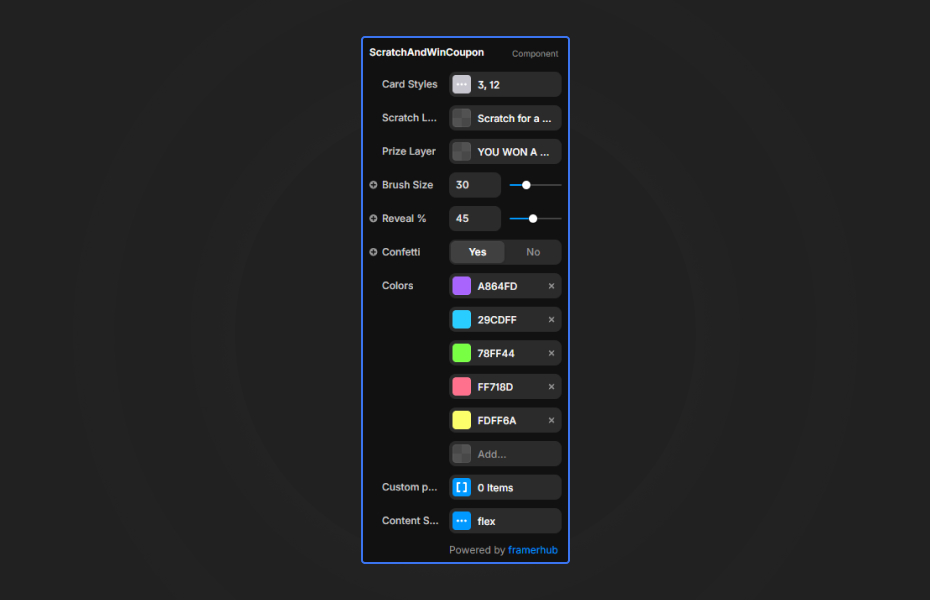
You style the card border, the foil (color, texture image and a call-to-action like "SCRATCH ME"), the prize label, code and background, the confetti, the brush size and the reveal threshold in Framer's properties panel. For full control, connect your own design as the prize.
Features
Realistic scratching. Interpolated strokes, so fast movements leave continuous lines.
Animated foil. A moving shine that disappears as the foil is scratched.
Auto-reveal. The prize clears once a set percentage is scratched.
Confetti. A ribbon burst on reveal, with custom colors.
Custom prize slot. Use any Frame or component as the winning state.
Touch support. Works on phones and tablets.
Where Scratch & Win Coupon works best
E-commerce discount codes. Put the card on a landing page with "Scratch to reveal your discount" above it and the code underneath. Earning the code feels like a win, and the confetti adds a moment of delight before checkout.
Newsletter rewards. Show the card on the thank-you page after signup, with a welcome offer as the prize. Visitors leave the flow with something.
Product and feature teasers. Hide a product image or launch date behind the foil on a "coming soon" page, using the custom prize slot.
Event and holiday campaigns. Seasonal foil textures and confetti colors make a festive giveaway page with very little design work.
How to Use
Customization
Card styles
- Border color, width and radius
Scratch layer
- Scratch Color: the foil color
- Scratch Image: a custom foil texture
- Scratch Text: a call-to-action such as "SCRATCH ME"
Prize layer
- Prize label and code
- Prize background color or image
Confetti
- Enable confetti
- Confetti colors
Custom prize
- Connect any Frame or component to the Custom prize connector (hides the default text controls)
Starting settings
Classic coupon. Silver foil, "SCRATCH ME", brush size 25, reveal at 55%, confetti in brand colors.
Premium offer. Gold foil texture image, dark prize background with a white code, brush size 20.
Teaser. Custom prize slot with a product image, reveal at 50%, confetti off for a calmer reveal.
Performance and mobile
The scratch surface is an HTML5 canvas with offscreen buffering, so it stays smooth on mobile. A brush size of 20 to 30 feels most satisfying: smaller is tedious and larger is too easy. Keep the reveal threshold around 50 to 60% so nobody has to hunt for the last flecks of foil.
Compared with similar components
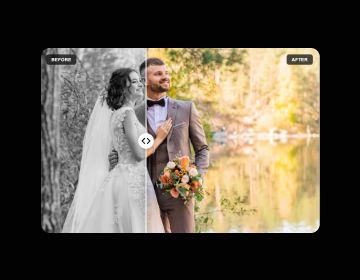
Before After Picture also reveals one layer under another, but as a comparison slider. Counter Number animates figures such as a discount percentage. Exit Popup can present the offer when visitors are about to leave. Choose Scratch & Win Coupon when you want the reveal itself to be the fun part.
How to install Scratch & Win Coupon in Framer
- Purchase Scratch & Win Coupon above
- Open your FramerHub dashboard
- Find Scratch & Win Coupon in Recent Purchases and click "Copy URL"
- Open your Framer project
- Paste it anywhere on the canvas (Cmd/Ctrl + V)
License
Single-use license: use it in one client project with full commercial rights. No redistribution. 1 license = 1 client.
Questions before buying? Read the refund policy or email hello@framerhub.io.
Scratch & Win Coupon FAQ
Does the scratch card work on phones?
Yes. It handles touch automatically, so visitors scratch with a finger on phones and tablets.
Can I design my own prize instead of a code?
Yes. Connect any Frame or component to the Custom prize connector and it becomes the prize layer. The default text controls are then hidden.
How much does a visitor need to scratch?
You set a reveal percentage. Around 50 to 60% works well: once that much is scratched, the whole prize is revealed automatically.
Can I turn off the confetti?
Yes. Confetti is on by default when the prize is revealed, and you can switch it off or change its colors.
Scratch & Win Coupon - $9
A foil coupon visitors scratch away with a mouse or finger to reveal a prize.

Trusted by agencies and freelancers
2,000+ Framer users rely on FramerHub plugins and components to build serious client sites.
"The Best Framer CMS Filtering Plugin I've Found — Truly a Game-Changer. I've tested a lot of Framer CMS filtering and sorting components — both free and paid — and this is by far the best one I've come across."
- Pierre Azalbert · CMS Filter
"Excellent product and super speedy and helpful support from the team!"
- Chloe Dovey · CMS Masonry Lightbox
"We had tried a couple of other Framer CMS filter components but they were buggy, hard to use and support was slow or non-existent. CMSFilter is easier to use and has a lot of added functionality."
- Mark Williamson · CMS Filter
"CMS Masonry-Lightbox is a super flexible and polished CMS grid that makes any portfolio shine. I especially love the support for local videos and the great customer support behind it."
- Rick van der Wal · CMS Masonry Lightbox
"I got a CMS featuring setup from Shahul Hameed, and it works perfectly. He was super helpful, guided me through everything, and even stayed up late to make sure I had no issues. Great experience overall!"
- Amarachi · CMS Filter
"Very happy with this purchase. Also the creators are very helpful, can only recommend."
- Petia Dimitrova · CMS Masonry Lightbox
"He really helped me out when I needed assistance adding it to my Framer project. Super fast customer support highly recommend!"
- Salman Abdulrazaq Ali
"Love the plugin, so glad you made it. … Thanks for building what Framer should have, you did a great job with it."
- Nathaniel DeSantis, Podcast Studio X · CMS Scheduler
"I updated the main CMS component in Framer and the bug is fixed now :) You are quick man! Love it."
- Marek · CMS Filter
"Amazing! This fixed the issue. Thanks so much for the help :)"
- Julie Elise Hauge · CMS Filter
Got questions? We've the answers
Got questions? We've the answers
Everything you need to know about FramerHub.