Cyberpunk City FREE
A WebGL cyberpunk cityscape with neon-lit buildings flying past.
Overview
A WebGL cyberpunk cityscape with neon-lit buildings flying past.
- Real-time WebGL shader animation
- Customizable neon colors and fog
- Adjustable building scale and height variation
- Smooth continuous animation loop
- Performance optimized
A WebGL cyberpunk city fly-through for Framer
Cyberpunk City flies the camera through an endless city of neon-lit buildings. Two neon colors light the towers, fog fades the distance into deep space, and the buildings keep streaming toward the viewer in a seamless loop with no visible restart. It is drawn by a ray-marching shader in WebGL, so there are no 3D models to load.
You control speed, building scale, height variation, fog, both neon colors and how they mix, the background (or full transparency) and the quality mode, all in Framer's properties panel. It is free.
Features
Shader-rendered city. Three.js with custom GLSL shaders and signed distance fields.
Two neon colors. Neon A and Neon B, with a mix control between them.
Building controls. Scale and height variation change the skyline from a low grid to towering skyscrapers.
Seamless loop. Continuous motion with no jumps, suitable for backgrounds.
Quality modes. Auto, Performance, Balanced or Quality, with pixel ratio capped at 2x.
Where Cyberpunk City works best
Game and esports sites. Full-screen hero with pink and cyan neon at medium speed, the game logo centered, and a "Play now" button. The motion sets the tone in a second.
Hackathons and tech events. Use the city behind the event name and dates. A slower speed keeps the text readable while still feeling alive.
Synthwave and music releases. Purple and orange neon with high height variation looks like an album cover in motion.
Startup "coming soon" pages. Transparent mode over a dark gradient, with an email signup on top, gives a launch page atmosphere without any custom design work.
How to Use
Customization
Animation
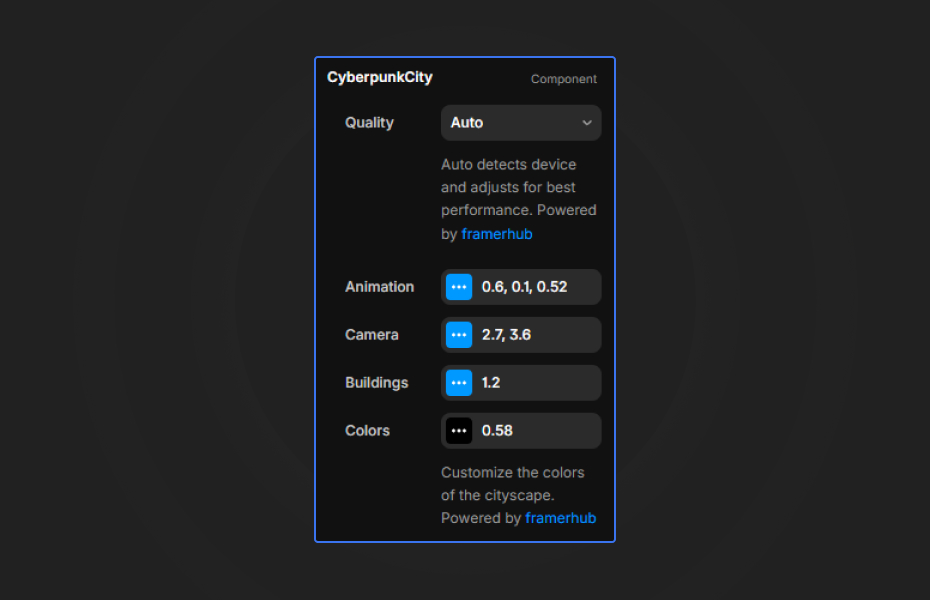
- Speed: 0 to 2x (low is a slow, dreamy glide; high is energetic)
- Height Variation: 0 to 1 (low gives uniform blocks, high gives skyscrapers)
Buildings
- Scale: 0.5 to 2x (large feels close and massive, small feels distant)
Colors
- Fog Color: the distance and space color
- Neon A: first neon color (default hot pink)
- Neon B: second neon color (default cyan)
- Neon Mix: blend between the two (0 to 1)
- Background: background color, with transparency support
- Transparent: one toggle to remove the background
Quality
- Auto (recommended), Performance, Balanced or Quality
Starting settings
Classic cyberpunk. Pink and cyan, black fog, speed 1, height variation 0.6.
Matrix. Two greens, black fog, speed 0.7, scale 1.2.
Synthwave. Purple and orange, dark purple fog, speed 0.8, height variation 0.9.
Performance and mobile
Leave quality on Auto so slower devices get a lighter render, and the pixel ratio never goes above 2x. The canvas shows a still frame while you edit; check motion in preview. It adapts to any container size, so it works as a full-screen background or inside a smaller card. Keep headlines as real text above the component for readability and search engines.
Compared with similar components
Warp Drive is a hyperspeed tunnel with car-light streaks, which reads as speed rather than place. The Digital Horizon is a 3D landscape of matrix-style particles and waves. Wire Terrain is a retro 80s wireframe landscape. Choose Cyberpunk City when you want a whole neon world, not just a pattern.
How to install Cyberpunk City in Framer
- Click "Download Now" and sign in with your free FramerHub account
- Open your FramerHub dashboard
- Find Cyberpunk City in Recent Purchases and click "Copy URL"
- Open your Framer project
- Paste it anywhere on the canvas (Cmd/Ctrl + V)
License
Free component: use it freely in personal and commercial projects.
Cyberpunk City FAQ
Is Cyberpunk City free?
Yes. It is a free component; sign in with a free FramerHub account to copy it.
Why is the city not moving on the Framer canvas?
The canvas shows a static frame to keep the editor fast. The animation plays in preview and on your published site.
Can I put the city behind other content?
Yes. Turn on Transparent to remove the background, then layer the city over a video, image or gradient, or place text on top of it.
Which quality mode should I use?
Auto, which checks the visitor's device and adjusts. Force Performance for heavy pages, or Quality when the city is the main focus on desktop.
Cyberpunk City - FREE
A WebGL cyberpunk cityscape with neon-lit buildings flying past.


Trusted by agencies and freelancers
2,000+ Framer users rely on FramerHub plugins and components to build serious client sites.
"The Best Framer CMS Filtering Plugin I've Found — Truly a Game-Changer. I've tested a lot of Framer CMS filtering and sorting components — both free and paid — and this is by far the best one I've come across."
- Pierre Azalbert · CMS Filter
"Excellent product and super speedy and helpful support from the team!"
- Chloe Dovey · CMS Masonry Lightbox
"We had tried a couple of other Framer CMS filter components but they were buggy, hard to use and support was slow or non-existent. CMSFilter is easier to use and has a lot of added functionality."
- Mark Williamson · CMS Filter
"CMS Masonry-Lightbox is a super flexible and polished CMS grid that makes any portfolio shine. I especially love the support for local videos and the great customer support behind it."
- Rick van der Wal · CMS Masonry Lightbox
"I got a CMS featuring setup from Shahul Hameed, and it works perfectly. He was super helpful, guided me through everything, and even stayed up late to make sure I had no issues. Great experience overall!"
- Amarachi · CMS Filter
"Very happy with this purchase. Also the creators are very helpful, can only recommend."
- Petia Dimitrova · CMS Masonry Lightbox
"He really helped me out when I needed assistance adding it to my Framer project. Super fast customer support highly recommend!"
- Salman Abdulrazaq Ali
"Love the plugin, so glad you made it. … Thanks for building what Framer should have, you did a great job with it."
- Nathaniel DeSantis, Podcast Studio X · CMS Scheduler
"I updated the main CMS component in Framer and the bug is fixed now :) You are quick man! Love it."
- Marek · CMS Filter
"Amazing! This fixed the issue. Thanks so much for the help :)"
- Julie Elise Hauge · CMS Filter
Got questions? We've the answers
Got questions? We've the answers
Everything you need to know about FramerHub.