Dot Globe
Interactive particle globe with Dots, Matrix, and ASCII rendering styles.
Overview
Interactive particle globe with Dots, Matrix, and ASCII rendering styles.
- 3 Rendering Styles (Dots, Matrix, ASCII)
- 3 Shapes (Sphere, Cube, Plane)
- Transparent background for layering
- Interactive mouse repulsion and tilt
- Advanced effects (Scanline, Wave, Glitch, Halo)
- Rainbow color animation mode
An interactive particle globe for Framer
Dot Globe draws a globe, cube or flat plane out of particles and lets you choose how those particles look: clean dots, falling Matrix-style characters, or ASCII text. The object rotates by itself, tilts toward the cursor and pushes particles away from the mouse, so visitors notice it responds to them. The background is transparent, so it sits on top of any section color, gradient or image.
You set the shape, style, density, color and effects in Framer's properties panel. Four optional effects (scanline, wave pulse, glitch and halo) can be layered on, which turns the same component into a calm earth, a hacker terminal or a glitching data object.
Features
Three rendering styles. Dots for a clean look, Matrix for digital rain, ASCII for a retro terminal.
Three shapes. Sphere, Cube or Plane, all with the same styles and effects.
Mouse interaction. Tilt toward the cursor plus particle repulsion, with auto rotation when idle.
Effects. Scanline, wave pulse, glitch distortion and halo glow, each switched on separately.
Rainbow mode. Animated rainbow colors instead of a single particle color.
Where Dot Globe works best
Global SaaS and logistics. The Sphere in Dots style with a soft halo says "worldwide" without a stock map. Put it to the right of a headline about countries served or teams in many time zones.
AI, crypto and security brands. Matrix style in green with the scanline effect, or ASCII in amber, fits products that want to look technical. A cube in ASCII style makes a good visual for "data" or "infrastructure".
Network and data stories. Use the Sphere with wave pulse on a section about connections, coverage or real-time data. The pulse reads as signals moving across the network.
Portfolio intros. A slowly rotating Plane in Dots style, set behind a name and title, gives a homepage subtle motion that responds when visitors move the mouse.
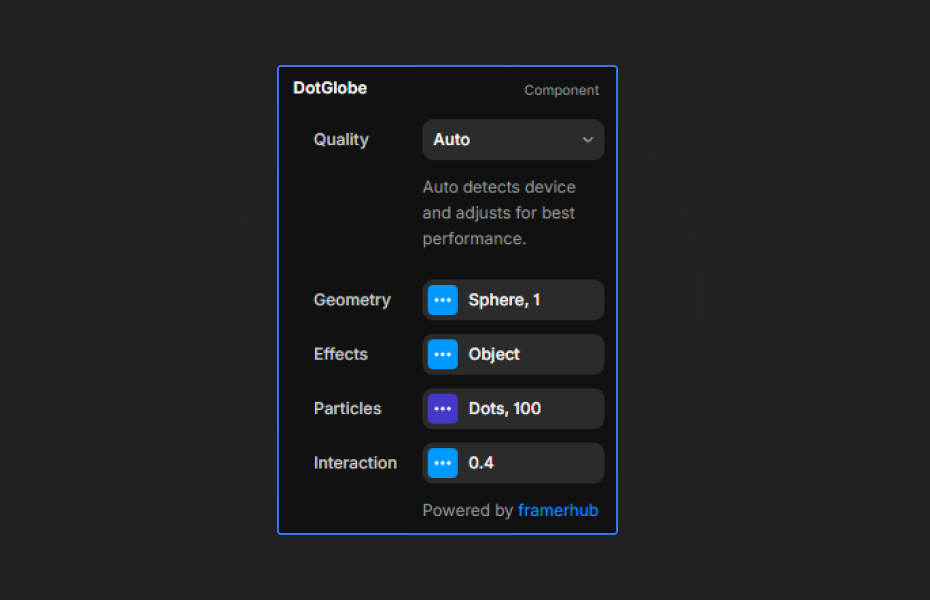
How to Use
Customization
Geometry
- Shape: Sphere, Cube or Plane
- Scale: size of the object
Particles
- Style: Dots, Matrix or ASCII
- Density: number of particles
- Color: particle color
- Rainbow Mode: animated rainbow colors
Effects
- Scanline: horizontal scanning line
- Wave Pulse: circular wave animation
- Glitch: digital distortion
- Halo: glow around the object
Interaction
- Auto Rotation: continuous spin
- Mouse Effect: tilt and particle repulsion
Starting settings
Earth. Sphere, Dots, a single brand color, halo on, every other effect off. This is the most neutral look and works on light or dark sections.
Terminal. Cube, ASCII, amber color, scanline on. Good for developer tools and retro-tech brands.
Digital rain. Sphere, Matrix, green, scanline and glitch on, on a black section.
Performance and mobile
Density drives the cost. Values between 40 and 80 run smoothly on most devices, and 30 to 40 is a safe range on phones. The halo works best on the Sphere shape. Because the background is transparent, you can put your own gradient behind the component instead of asking it to draw one, which keeps the effect lighter.
Compared with similar components
Neural Core is also a particle sphere made of characters, but it adds a bloom glow and noise distortion for a softer, more organic "AI brain" look. Dot Text uses the same particle idea for words instead of shapes. Kinetic ASCII turns a 3D knot or your own image into dot-matrix art. Choose Dot Globe when you want a recognizable globe or cube with several styles and effects to switch between.
How to install Dot Globe in Framer
- Purchase Dot Globe above
- Open your FramerHub dashboard
- Find Dot Globe in Recent Purchases and click "Copy URL"
- Open your Framer project
- Paste it anywhere on the canvas (Cmd/Ctrl + V)
License
Single-use license: use it in one client project with full commercial rights. No redistribution. 1 license = 1 client.
Questions before buying? Read the refund policy or email hello@framerhub.io.
Dot Globe FAQ
Does Dot Globe have a transparent background?
Yes. The background is always transparent, so you can place the globe over a gradient, an image or a dark section color and it blends in.
Can I show a cube or a flat plane instead of a globe?
Yes. The Shape setting switches between Sphere, Cube and Plane, and every rendering style and effect works with all three shapes.
What density should I use on mobile?
A density between 40 and 80 runs smoothly on most devices. On mobile breakpoints, 30 to 40 keeps the animation fluid.
Does the globe react to the cursor?
Yes. With the mouse effect on, the object tilts toward the cursor and nearby particles push away from it. Auto rotation keeps it moving when nobody is interacting.
Dot Globe - $14
Interactive particle globe with Dots, Matrix, and ASCII rendering styles.

Trusted by agencies and freelancers
2,000+ Framer users rely on FramerHub plugins and components to build serious client sites.
"The Best Framer CMS Filtering Plugin I've Found — Truly a Game-Changer. I've tested a lot of Framer CMS filtering and sorting components — both free and paid — and this is by far the best one I've come across."
- Pierre Azalbert · CMS Filter
"Excellent product and super speedy and helpful support from the team!"
- Chloe Dovey · CMS Masonry Lightbox
"We had tried a couple of other Framer CMS filter components but they were buggy, hard to use and support was slow or non-existent. CMSFilter is easier to use and has a lot of added functionality."
- Mark Williamson · CMS Filter
"CMS Masonry-Lightbox is a super flexible and polished CMS grid that makes any portfolio shine. I especially love the support for local videos and the great customer support behind it."
- Rick van der Wal · CMS Masonry Lightbox
"I got a CMS featuring setup from Shahul Hameed, and it works perfectly. He was super helpful, guided me through everything, and even stayed up late to make sure I had no issues. Great experience overall!"
- Amarachi · CMS Filter
"Very happy with this purchase. Also the creators are very helpful, can only recommend."
- Petia Dimitrova · CMS Masonry Lightbox
"He really helped me out when I needed assistance adding it to my Framer project. Super fast customer support highly recommend!"
- Salman Abdulrazaq Ali
"Love the plugin, so glad you made it. … Thanks for building what Framer should have, you did a great job with it."
- Nathaniel DeSantis, Podcast Studio X · CMS Scheduler
"I updated the main CMS component in Framer and the bug is fixed now :) You are quick man! Love it."
- Marek · CMS Filter
"Amazing! This fixed the issue. Thanks so much for the help :)"
- Julie Elise Hauge · CMS Filter
Got questions? We've the answers
Got questions? We've the answers
Everything you need to know about FramerHub.