Kinetic ASCII
Turns shapes and images into dot-matrix ASCII art with real-time 3D animation.
Overview
Turns shapes and images into dot-matrix ASCII art with real-time 3D animation.
- Animated 3D Torus Knot shape
- Custom image to ASCII conversion
- Transparent background support
- True Color mode for original colors
- Retro CRT scanline overlay
- Real-time dot-matrix rendering
Dot-matrix ASCII art from a 3D shape or your own image
Kinetic ASCII redraws a rotating 3D torus knot, or any image you upload, as a grid of ASCII dots. The knot is lit from several directions, so the dots carry real depth and shading as it turns. Switch on True Color to keep the source's colors, add scanlines for a CRT look, or set a transparent background and layer it over your design. It runs on Three.js with GPU rendering.
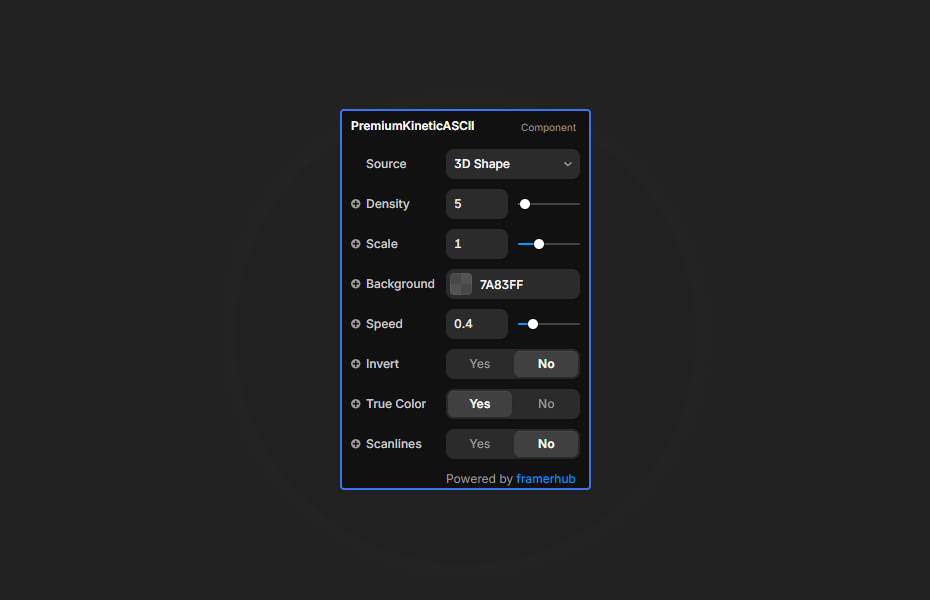
All settings live in Framer's properties panel: source, density, scale, color, background, invert, speed, true color and scanlines.
Features
Animated 3D torus knot. A lit, continuously rotating shape drawn entirely in dots.
Image to ASCII. Upload a logo, portrait or product photo and get a dot-matrix version.
True Color mode. Keep the original colors instead of a single dot color.
Transparent background. Layer the effect over any content.
CRT scanlines. An optional, subtle retro overlay.
Where Kinetic ASCII works best
Developer and creative-coding portfolios. Use the rotating knot in a single green or amber color on black as the homepage hero. It signals technical taste immediately.
Music and event pages. Upload an artist photo, turn on True Color and scanlines, and you get a poster-like visual that feels made for the release.
Brand logos with a twist. Convert a high-contrast logo into ASCII on a dark section, with Invert on if the logo is dark on light.
Tech and gaming launches. Place the knot over a gradient with a transparent background, behind a product name, for a retro-futurist hero.
How to Use
Customization
Source
- 3D Shape: animated torus knot (default)
- Image: upload your own
Visual
- Density: dot size (4 = large dots, 32 = fine detail)
- Scale: content size (0.1 to 3.0, default 1.0)
- Color: dot color (hidden when True Color is on)
- Background: a color, or transparent
- Invert: flip the brightness mapping
Animation
- Speed: rotation speed (0 = static, 2 = fast)
Effects
- True Color: use the source's colors
- Scanlines: retro CRT overlay (off by default)
Starting settings
Terminal knot. 3D Shape, density 12, green dots, black background, speed 0.5, scanlines on.
Poster portrait. Image source, density 16, True Color on, scanlines on, speed 0.
Layered logo. Image source, density 10, transparent background, Invert on if needed, placed over a brand gradient.
Performance and mobile
Higher density values (smaller dots) actually render faster, so 10 to 12 is a good starting point on desktop and 16 to 24 on phones. Use Scale to fit the shape or image inside the frame instead of resizing the component. Scanlines are subtle by design and show best on larger frames.
Compared with similar components
ASCII Image converts an image into character-based ASCII art with custom characters, rather than dots. Sprite Video ASCII does the same for video. Dot Globe builds a globe, cube or plane from particles with Dots, Matrix and ASCII styles. Choose Kinetic ASCII when you want a lit, rotating 3D form or a dot-matrix take on an image.
How to install Kinetic ASCII in Framer
- Purchase Kinetic ASCII above
- Open your FramerHub dashboard
- Find Kinetic ASCII in Recent Purchases and click "Copy URL"
- Open your Framer project
- Paste it anywhere on the canvas (Cmd/Ctrl + V)
License
Single-use license: use it in one client project with full commercial rights. No redistribution. 1 license = 1 client.
Questions before buying? Read the refund policy or email hello@framerhub.io.
Kinetic ASCII FAQ
Can Kinetic ASCII convert my own image?
Yes. Switch the source from the 3D shape to Image and upload any picture. It is redrawn as dot-matrix ASCII, in a single color or in the image's own colors with True Color on.
What density gives the best balance of detail and speed?
Start with 10 to 12. Higher density values mean smaller dots, which show more detail. On mobile, 16 to 24 keeps the animation smooth.
Can I put Kinetic ASCII on top of other content?
Yes. Set the background to transparent and layer the component over a gradient, photo or section color.
Can I stop the rotation?
Yes. Speed controls the rotation from 0 (static) to 2 (fast), so set it to 0 for a still result.
Kinetic ASCII - $9
Turns shapes and images into dot-matrix ASCII art with real-time 3D animation.
You might also like

Trusted by agencies and freelancers
2,000+ Framer users rely on FramerHub plugins and components to build serious client sites.
"The Best Framer CMS Filtering Plugin I've Found — Truly a Game-Changer. I've tested a lot of Framer CMS filtering and sorting components — both free and paid — and this is by far the best one I've come across."
- Pierre Azalbert · CMS Filter
"Excellent product and super speedy and helpful support from the team!"
- Chloe Dovey · CMS Masonry Lightbox
"We had tried a couple of other Framer CMS filter components but they were buggy, hard to use and support was slow or non-existent. CMSFilter is easier to use and has a lot of added functionality."
- Mark Williamson · CMS Filter
"CMS Masonry-Lightbox is a super flexible and polished CMS grid that makes any portfolio shine. I especially love the support for local videos and the great customer support behind it."
- Rick van der Wal · CMS Masonry Lightbox
"I got a CMS featuring setup from Shahul Hameed, and it works perfectly. He was super helpful, guided me through everything, and even stayed up late to make sure I had no issues. Great experience overall!"
- Amarachi · CMS Filter
"Very happy with this purchase. Also the creators are very helpful, can only recommend."
- Petia Dimitrova · CMS Masonry Lightbox
"He really helped me out when I needed assistance adding it to my Framer project. Super fast customer support highly recommend!"
- Salman Abdulrazaq Ali
"Love the plugin, so glad you made it. … Thanks for building what Framer should have, you did a great job with it."
- Nathaniel DeSantis, Podcast Studio X · CMS Scheduler
"I updated the main CMS component in Framer and the bug is fixed now :) You are quick man! Love it."
- Marek · CMS Filter
"Amazing! This fixed the issue. Thanks so much for the help :)"
- Julie Elise Hauge · CMS Filter
Got questions? We've the answers
Got questions? We've the answers
Everything you need to know about FramerHub.