Neural Core
A 3D sphere of ASCII particles with bloom.
Overview
A 3D sphere of ASCII particles with bloom.
- 3D ASCII particle sphere
- Three character sets (Binary, Hex, Glyphs)
- Customizable bloom glow effect
- Interactive mouse tilt
- Auto quality detection
- Transparent background support
- Canvas-optimized performance
- Dual-color gradient particles
A 3D ASCII particle sphere for AI and tech brands
Neural Core is a sphere built from thousands of text characters that drift, distort and rotate in 3D. A two-color gradient runs from the core to the outer edge, an optional bloom adds glow, and the whole sphere tilts toward the cursor. It reads at a glance as a brain, a data core or a model thinking, which is why it works so well on AI products.
You choose the characters (binary, hex or glyphs), the colors, the particle count and how strongly noise distorts the surface, all from Framer's properties panel. Quality adapts to the visitor's device automatically.
Features
ASCII particle sphere. Thousands of characters arranged in 3D with real depth, rendered on a canvas.
Three character sets. Binary, Hex or Glyphs to set the tone.
Bloom glow. Adjustable glow intensity for a neon, sci-fi finish.
Mouse tilt. The sphere leans toward the cursor with adjustable strength.
Auto quality. Detects device capability and scales detail to match.
Dual-color gradient. Separate core and outer colors.
Where Neural Core works best
AI product heroes. Put Neural Core to the right of a headline such as "Your data, understood", in cyan and magenta with bloom on a near-black background. The sphere does the job a product screenshot would otherwise have to do.
Loading and waiting states. On a page where results take a few seconds, a slowly rotating sphere with low distortion keeps the screen alive without looking like an error.
Developer and security tools. Hex characters in green on black look like a terminal or a key being generated. Lower the rotation speed so it feels precise rather than playful.
Section dividers. A small sphere with Transparent BG on, placed between two content sections, adds a moment of motion on a long landing page.
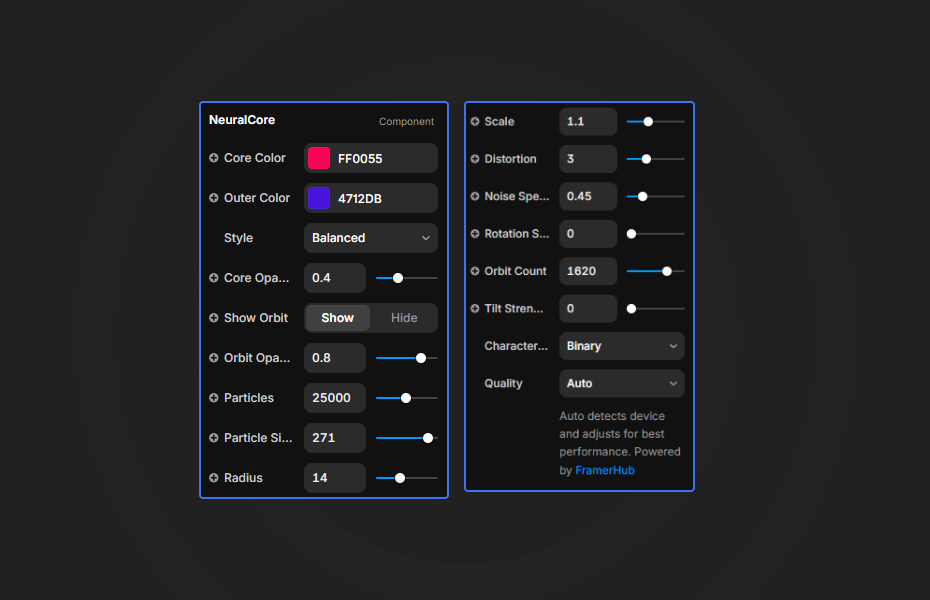
How to Use
Customization
Colors
- Core Color: inner particle color
- Outer Color: outer gradient color
- Background: scene color (hidden when Transparent BG is on)
Particles
- Count: number of particles (main performance setting)
- Size: character size
- Radius: sphere radius
- Scale: overall size
Animation
- Distortion: noise displacement strength
- Noise Speed: how fast the surface moves
- Rotation Speed: how fast the sphere spins
Effects
- Bloom: glow intensity
- Tilt Strength: mouse sensitivity
- Character Set: Binary, Hex or Glyphs
- Transparent BG: transparency on (disables bloom)
Starting settings
AI hero. Glyphs, cyan core and magenta outer color, bloom on, low distortion, slow rotation.
Terminal. Hex, green on black, bloom low, medium rotation, tilt strength low.
Layered. Binary, white characters, Transparent BG on, placed over a brand gradient.
Performance and mobile
Particle count is the main cost. Leave quality on Auto, and keep mobile counts between 5,000 and 10,000. Bright neon colors on dark backgrounds make bloom look strongest, so you rarely need high bloom values. Transparent BG is lighter than bloom when you need the sphere on top of other content.
Compared with similar components
Dot Globe is a particle globe, cube or plane with Dots, Matrix and ASCII styles plus scanline and glitch effects, and it has a transparent background by default. Nebula Hero is a full galaxy of particles for a whole section rather than a single object. Neural Grid is a flat network of connected nodes for a background. Choose Neural Core when you want one glowing focal object that says "AI" without words.
How to install Neural Core in Framer
- Purchase Neural Core above
- Open your FramerHub dashboard
- Find Neural Core in Recent Purchases and click "Copy URL"
- Open your Framer project
- Paste it anywhere on the canvas (Cmd/Ctrl + V)
License
Single-use license: use it in one client project with full commercial rights. No redistribution. 1 license = 1 client.
Questions before buying? Read the refund policy or email hello@framerhub.io.
Neural Core FAQ
Can Neural Core have a transparent background?
Yes. Turn on Transparent BG to layer the sphere over your own section color or image. Bloom glow is disabled while the background is transparent, so pick one or the other.
How many particles should I use?
Use the Auto quality mode, which adapts to the visitor's device. On mobile, 5,000 to 10,000 particles keeps the sphere smooth.
What do the three character sets look like?
Binary uses 0s and 1s and feels like classic computing, Hex uses 0 to 9 and A to F and suits crypto or security brands, and Glyphs uses symbols for a more sci-fi look.
Does Neural Core react to the mouse?
Yes. The sphere tilts toward the cursor, and Tilt Strength controls how far it moves.
Neural Core - $14
A 3D sphere of ASCII particles with bloom.
Trusted by agencies and freelancers
2,000+ Framer users rely on FramerHub plugins and components to build serious client sites.
"The Best Framer CMS Filtering Plugin I've Found — Truly a Game-Changer. I've tested a lot of Framer CMS filtering and sorting components — both free and paid — and this is by far the best one I've come across."
- Pierre Azalbert · CMS Filter
"Excellent product and super speedy and helpful support from the team!"
- Chloe Dovey · CMS Masonry Lightbox
"We had tried a couple of other Framer CMS filter components but they were buggy, hard to use and support was slow or non-existent. CMSFilter is easier to use and has a lot of added functionality."
- Mark Williamson · CMS Filter
"CMS Masonry-Lightbox is a super flexible and polished CMS grid that makes any portfolio shine. I especially love the support for local videos and the great customer support behind it."
- Rick van der Wal · CMS Masonry Lightbox
"I got a CMS featuring setup from Shahul Hameed, and it works perfectly. He was super helpful, guided me through everything, and even stayed up late to make sure I had no issues. Great experience overall!"
- Amarachi · CMS Filter
"Very happy with this purchase. Also the creators are very helpful, can only recommend."
- Petia Dimitrova · CMS Masonry Lightbox
"He really helped me out when I needed assistance adding it to my Framer project. Super fast customer support highly recommend!"
- Salman Abdulrazaq Ali
"Love the plugin, so glad you made it. … Thanks for building what Framer should have, you did a great job with it."
- Nathaniel DeSantis, Podcast Studio X · CMS Scheduler
"I updated the main CMS component in Framer and the bug is fixed now :) You are quick man! Love it."
- Marek · CMS Filter
"Amazing! This fixed the issue. Thanks so much for the help :)"
- Julie Elise Hauge · CMS Filter
Got questions? We've the answers
Got questions? We've the answers
Everything you need to know about FramerHub.