Reaction Diffusion
Animated reaction-diffusion pattern generator powered by WebGL shaders.
Overview
Animated reaction-diffusion pattern generator powered by WebGL shaders.
- Procedural pattern generation
- Infinite non-looping animation
- Customizable complexity and scale
- Lightweight WebGL rendering
- Transparent background
Organic, evolving patterns for Framer backgrounds
Reaction Diffusion simulates two chemicals spreading and reacting on a surface, the same process that is thought to shape zebra stripes, fingerprints and coral. On your page it looks like living, ever-changing patterns of blobs and lines that slowly grow, split and wander. The animation never loops, and the background is transparent, so it layers over any section.
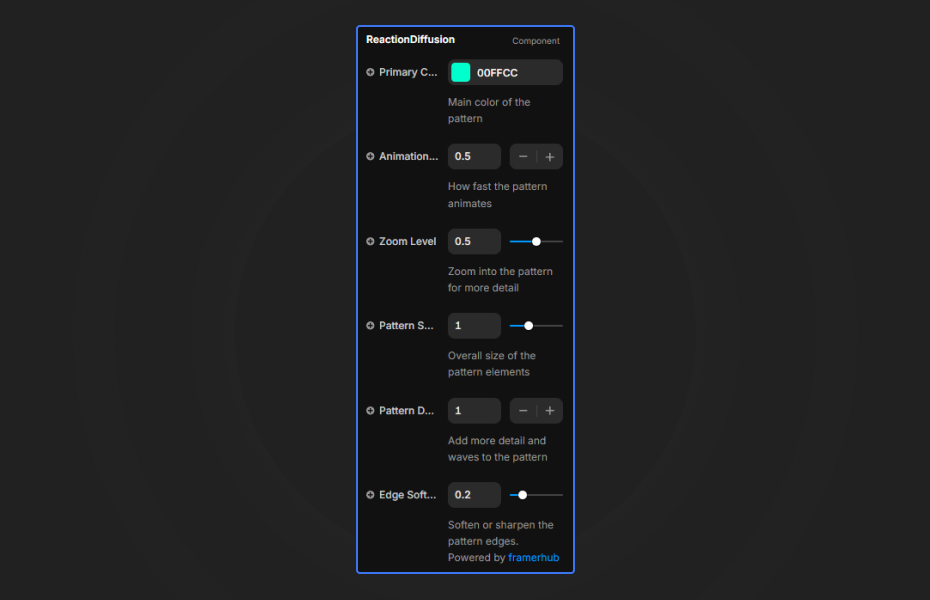
You set the primary color, edge softness, zoom, pattern scale and density in Framer's properties panel. It runs as a lightweight WebGL shader.
Features
Procedural patterns. Fingerprint, stripe and coral-like textures generated live.
Never repeats. An infinite, non-looping simulation.
Structure controls. Zoom, scale and density from large smooth blobs to intricate lines.
Edge softness. Crisp graphic edges or soft, blurred transitions.
Transparent background. Layer it on any color.
Where Reaction Diffusion works best
Biotech, health and science brands. A soft, slow pattern in a clinical green or blue behind a headline about research suggests biology without stock imagery.
Generative art and design studios. A high-density pattern with crisp edges as the hero shows taste for code-driven visuals.
Fashion and textile pages. Large, soft blobs in a brand color read as a print or fabric, good behind a collection title.
Glassmorphism layouts. Put frosted-glass cards (background blur) over the moving pattern for a layered, modern look.
How to Use
Customization
Appearance
- Colors: primary color for the pattern
- Edge Softness: sharp or soft transitions
Pattern structure
- Zoom Level: zoom in or out of the pattern
- Pattern Scale: overall texture size
- Pattern Density: complexity and detail
Starting settings
Ambient. Low density, high edge softness, a slow speed around 0.1 to 0.3, muted brand color.
Digital. High density, crisp edges, neon green on a dark section.
Print. Large scale, low density, soft edges, a single fashion color on a light section.
Performance and mobile
The shader runs on the GPU and is light, but lower the density slightly on phones if you see slowdowns. Lower speeds suit ambient backgrounds; speeds of 1.0 and above feel energetic and psychedelic. Because the background is transparent, the section's own color does half the styling.
Compared with similar components
Fluid Noise creates soft fluid textures rather than cellular patterns. Dither Shader applies a retro dithering effect. Shader Frame gives an interactive shader with distortion controls. Choose Reaction Diffusion when you want organic, biological-looking patterns that keep evolving.
How to install Reaction Diffusion in Framer
- Purchase Reaction Diffusion above
- Open your FramerHub dashboard
- Find Reaction Diffusion in Recent Purchases and click "Copy URL"
- Open your Framer project
- Paste it anywhere on the canvas (Cmd/Ctrl + V)
License
Single-use license: use it in one client project with full commercial rights. No redistribution. 1 license = 1 client.
Questions before buying? Read the refund policy or email hello@framerhub.io.
Reaction Diffusion FAQ
Does the pattern loop?
No. It is an infinite, non-looping simulation, so the pattern keeps evolving without repeating.
Does it have a transparent background?
Yes. Layer it over a dark or light section, or place content on top of it.
How do I get finer, more detailed patterns?
Raise Pattern Density for more intricate lines, and use Zoom Level and Pattern Scale to set how large the shapes appear.
Is it heavy on mobile?
It runs on the GPU and is generally light. If you notice slowdowns on older phones, lower the density.
Reaction Diffusion - $9
Animated reaction-diffusion pattern generator powered by WebGL shaders.
Trusted by agencies and freelancers
2,000+ Framer users rely on FramerHub plugins and components to build serious client sites.
"The Best Framer CMS Filtering Plugin I've Found — Truly a Game-Changer. I've tested a lot of Framer CMS filtering and sorting components — both free and paid — and this is by far the best one I've come across."
- Pierre Azalbert · CMS Filter
"Excellent product and super speedy and helpful support from the team!"
- Chloe Dovey · CMS Masonry Lightbox
"We had tried a couple of other Framer CMS filter components but they were buggy, hard to use and support was slow or non-existent. CMSFilter is easier to use and has a lot of added functionality."
- Mark Williamson · CMS Filter
"CMS Masonry-Lightbox is a super flexible and polished CMS grid that makes any portfolio shine. I especially love the support for local videos and the great customer support behind it."
- Rick van der Wal · CMS Masonry Lightbox
"I got a CMS featuring setup from Shahul Hameed, and it works perfectly. He was super helpful, guided me through everything, and even stayed up late to make sure I had no issues. Great experience overall!"
- Amarachi · CMS Filter
"Very happy with this purchase. Also the creators are very helpful, can only recommend."
- Petia Dimitrova · CMS Masonry Lightbox
"He really helped me out when I needed assistance adding it to my Framer project. Super fast customer support highly recommend!"
- Salman Abdulrazaq Ali
"Love the plugin, so glad you made it. … Thanks for building what Framer should have, you did a great job with it."
- Nathaniel DeSantis, Podcast Studio X · CMS Scheduler
"I updated the main CMS component in Framer and the bug is fixed now :) You are quick man! Love it."
- Marek · CMS Filter
"Amazing! This fixed the issue. Thanks so much for the help :)"
- Julie Elise Hauge · CMS Filter
Got questions? We've the answers
Got questions? We've the answers
Everything you need to know about FramerHub.