Dither Shader FREE
An interactive dithering shader with a retro pixel look.
Overview
An interactive dithering shader with a retro pixel look.
- Dynamic dithering with customizable shapes
- Interactive ripple effects on click
- Gradient and glow post-processing
- Smart performance auto-scaling
Dither Shader
An interactive dithering shader for Framer with a retro pixel look. You choose the pixel shape, pattern and colors, and clicks or taps send ripples through the pattern.
Features
Dithering controls. Pixel size, pattern density and noise amount.
4 shapes. Square, Circle, Triangle and Diamond pixels.
Ripples. Clicks and taps send out ripples, with adjustable strength, width and speed.
Gradient. An optional two-color gradient from bottom to top.
Glow. A built-in glow for a neon look.
Performance controls. Resolution scales with the device, and the shader pauses when it's off screen.
Use Cases
Hero backgrounds. A retro hero visitors can click to ripple.
Portfolios. A pixel-art texture behind design work.
Landing pages. A moving background that reacts to taps.
Music and art sites. A bold, lo-fi look.
How to Use
Customization
Appearance Section
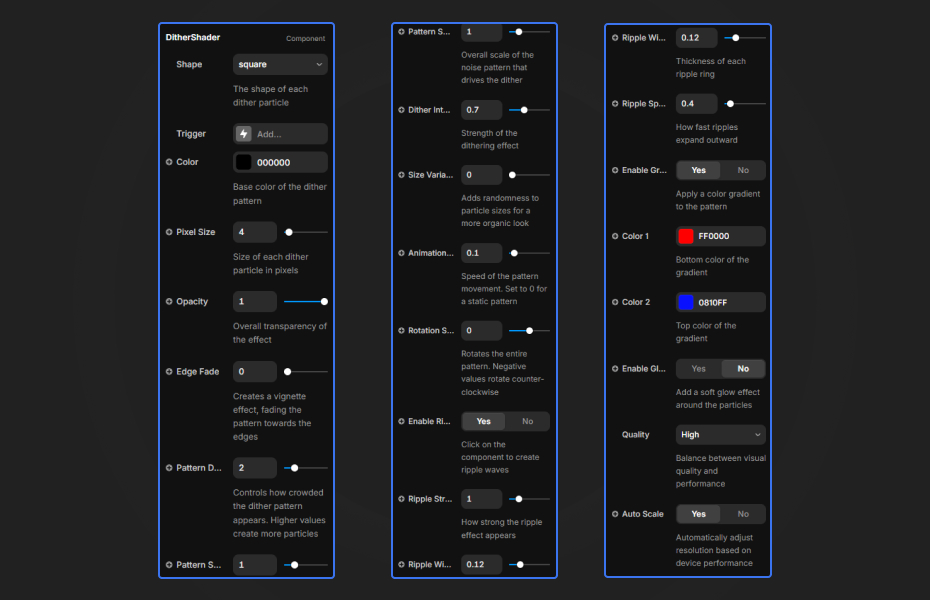
- Shape: Square, Circle, Triangle, Diamond
- Color: Primary pattern color
- Pixel Size: Larger = blockier retro look
- Opacity: Overall transparency
- Edge Fade: Vignette effect
Pattern Section
- Pattern Density: How "full" the pattern looks
- Pattern Scale: Underlying noise texture scale
- Dither Intensity: Amount of noise/dithering
- Size Variation: Random size variation
Animation Section
- Animation Speed: Pattern evolution speed
- Rotation Speed: Pattern rotation
- Color Pulse: Enable pulsating color animation
- Pulse Speed: Color pulse animation speed
- Pulse Intensity: Strength of pulse effect
Ripples Section
- Enable Ripples: Toggle click/tap ripples
- Ripple Strength: Distortion intensity
- Ripple Width: Wave thickness
- Ripple Speed: Expansion speed
Gradient Section
- Enable Gradient: Switch to 2-color gradient
- Color 1: Bottom color of the gradient
- Color 2: Top color of the gradient
Glow Section
- Enable Glow: Add bloom/glow effect
- Glow Strength: Intensity
- Glow Size: Blur radius
Performance Section
- Performance Mode: High / Balanced / Low
- Auto Scale: Dynamic resolution adjustment
- Pause Offscreen: Save battery when hidden
- Target FPS: Framerate target (default: 60)
Quick Tips
Performance mode. "Balanced" suits most devices. Use "Low" on mobile.
Retro look. A Pixel Size of 8 to 16 with muted colors.
Ripples. Turn on Ripples and place the shader where visitors will click.
Canvas preview. On the Framer canvas the component switches to high quality, so the preview matches the live site.
How to install Dither Shader in Framer
- Click "Download Now" and sign in with your free FramerHub account
- Open your FramerHub dashboard
- Find Dither Shader in Recent Purchases and click "Copy URL"
- Open your Framer project
- Paste it anywhere on the canvas (Cmd/Ctrl + V)
License
Free component: use it freely in personal and commercial projects.
Dither Shader - FREE
An interactive dithering shader with a retro pixel look.


Trusted by agencies and freelancers
2,000+ Framer users rely on FramerHub plugins and components to build serious client sites.
"The Best Framer CMS Filtering Plugin I've Found — Truly a Game-Changer. I've tested a lot of Framer CMS filtering and sorting components — both free and paid — and this is by far the best one I've come across."
- Pierre Azalbert · CMS Filter
"Excellent product and super speedy and helpful support from the team!"
- Chloe Dovey · CMS Masonry Lightbox
"We had tried a couple of other Framer CMS filter components but they were buggy, hard to use and support was slow or non-existent. CMSFilter is easier to use and has a lot of added functionality."
- Mark Williamson · CMS Filter
"CMS Masonry-Lightbox is a super flexible and polished CMS grid that makes any portfolio shine. I especially love the support for local videos and the great customer support behind it."
- Rick van der Wal · CMS Masonry Lightbox
"I got a CMS featuring setup from Shahul Hameed, and it works perfectly. He was super helpful, guided me through everything, and even stayed up late to make sure I had no issues. Great experience overall!"
- Amarachi · CMS Filter
"Very happy with this purchase. Also the creators are very helpful, can only recommend."
- Petia Dimitrova · CMS Masonry Lightbox
"He really helped me out when I needed assistance adding it to my Framer project. Super fast customer support highly recommend!"
- Salman Abdulrazaq Ali
"Love the plugin, so glad you made it. … Thanks for building what Framer should have, you did a great job with it."
- Nathaniel DeSantis, Podcast Studio X · CMS Scheduler
"I updated the main CMS component in Framer and the bug is fixed now :) You are quick man! Love it."
- Marek · CMS Filter
"Amazing! This fixed the issue. Thanks so much for the help :)"
- Julie Elise Hauge · CMS Filter
Got questions? We've the answers
Got questions? We've the answers
Everything you need to know about FramerHub.