ElectricBolts FREE
Animated electric bolts drawn with mesh lines.
Overview
Animated electric bolts drawn with mesh lines.
- Animated 3D mesh lines with electric energy effect
- Customizable multi-color gradient system
- Adjustable turbulence and frequency controls
- Smooth performance with WebGL rendering
Animated electric energy bolts for Framer
Electric Bolts sends streaks of energy across the frame as glowing 3D lines that pulse and flow, with up to four colors blending along each bolt. Turbulence decides whether they arc smoothly like a plasma lamp or thrash like a storm, and frequency decides how many there are. It is free and adapts to any container size.
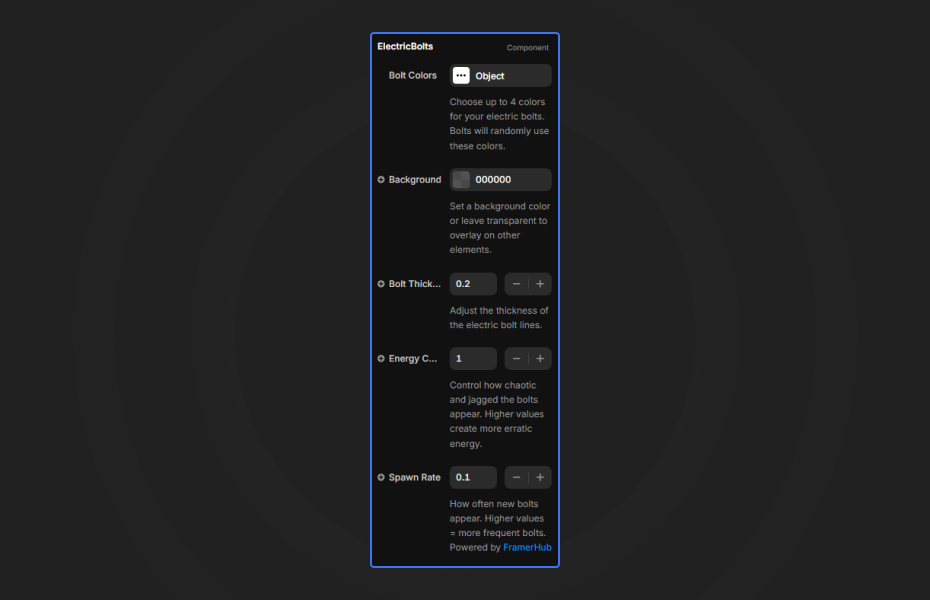
You set the four bolt colors, background, line width, turbulence and frequency in Framer's properties panel. It renders with Three.js and MeshLine.
Features
3D mesh lines. Animated bolts with an organic energy flow.
Four-color gradients. Colors blend along each bolt.
Turbulence. From controlled arcs (0.5) to chaotic storms (5).
Frequency. From sparse, dramatic strikes to a dense energy field.
Responsive. Fills any section or container.
Where Electric Bolts works best
Energy, EV and battery brands. Cyan and electric blue bolts at low turbulence behind a headline about power or charging speed.
Gaming and esports. Magenta, cyan and violet at high turbulence and frequency behind a tournament name for maximum intensity.
AI and "power-up" product launches. A few sparse, wide bolts at medium turbulence suggest speed and capability without clutter.
Event countdowns. Bolts behind a countdown or "Live now" banner make a launch or stream page feel charged.
How to Use
Customization
Color system
- Color 1 to 4: gradient along the bolts
- Background Color: canvas color (dark works best)
Line appearance
- Line Width: 0.5 to 5.0 (default 2.0)
Animation
- Turbulence: randomness (0 to 5)
- Frequency: bolt density and spawn rate
Starting settings
Clean tech. Two blues and a white, turbulence 1, line width 1.2, low frequency.
Balanced hero. Cyan, magenta and electric blue, turbulence 1.5, line width 2, medium frequency.
Storm. Four neon colors, turbulence 4, line width 3.5, high frequency.
Performance and mobile
Rendering is hardware-accelerated. Three or four colors give the best gradients without slowing lower-end devices, and a lower frequency on phones keeps it smooth. Place bright or glowing text on top for readability.
Compared with similar components
Shooting Stars uses the same animated mesh lines as diagonal streaks across a starfield, which is calmer. Neon Trails draws a spiral of neon lines. Confetti Lines 3D uses dashed lines for a celebratory mood. Choose Electric Bolts when you want visible energy and tension.
Credits
Built upon Animated Mesh Lines by Jeremboo for Codrops.
How to install ElectricBolts in Framer
- Click "Download Now" and sign in with your free FramerHub account
- Open your FramerHub dashboard
- Find ElectricBolts in Recent Purchases and click "Copy URL"
- Open your Framer project
- Paste it anywhere on the canvas (Cmd/Ctrl + V)
License
Free component: use it freely in personal and commercial projects.
ElectricBolts FAQ
Is Electric Bolts free?
Yes. It is a free component; sign in with a free FramerHub account to copy it.
How do I make the bolts calmer or wilder?
Turbulence runs from 0 to 5. Use 0.5 to 1.5 for smooth, controlled bolts and 3 to 5 for chaotic energy. Start at 1.5.
What background works best?
Dark colors such as black, deep blue or dark purple, with neon bolt colors like cyan, magenta and electric blue.
How many colors should I use?
Each bolt can blend up to four colors along its length. Three or four colors give the best gradients without extra cost on low-end devices.
ElectricBolts - FREE
Animated electric bolts drawn with mesh lines.
You might also like
Trusted by agencies and freelancers
2,000+ Framer users rely on FramerHub plugins and components to build serious client sites.
"The Best Framer CMS Filtering Plugin I've Found — Truly a Game-Changer. I've tested a lot of Framer CMS filtering and sorting components — both free and paid — and this is by far the best one I've come across."
- Pierre Azalbert · CMS Filter
"Excellent product and super speedy and helpful support from the team!"
- Chloe Dovey · CMS Masonry Lightbox
"We had tried a couple of other Framer CMS filter components but they were buggy, hard to use and support was slow or non-existent. CMSFilter is easier to use and has a lot of added functionality."
- Mark Williamson · CMS Filter
"CMS Masonry-Lightbox is a super flexible and polished CMS grid that makes any portfolio shine. I especially love the support for local videos and the great customer support behind it."
- Rick van der Wal · CMS Masonry Lightbox
"I got a CMS featuring setup from Shahul Hameed, and it works perfectly. He was super helpful, guided me through everything, and even stayed up late to make sure I had no issues. Great experience overall!"
- Amarachi · CMS Filter
"Very happy with this purchase. Also the creators are very helpful, can only recommend."
- Petia Dimitrova · CMS Masonry Lightbox
"He really helped me out when I needed assistance adding it to my Framer project. Super fast customer support highly recommend!"
- Salman Abdulrazaq Ali
"Love the plugin, so glad you made it. … Thanks for building what Framer should have, you did a great job with it."
- Nathaniel DeSantis, Podcast Studio X · CMS Scheduler
"I updated the main CMS component in Framer and the bug is fixed now :) You are quick man! Love it."
- Marek · CMS Filter
"Amazing! This fixed the issue. Thanks so much for the help :)"
- Julie Elise Hauge · CMS Filter
Got questions? We've the answers
Got questions? We've the answers
Everything you need to know about FramerHub.