Digital Rain
A Matrix-inspired falling code effect with customizable colors, size, and 3D depth.
Overview
A Matrix-inspired falling code effect with customizable colors, size, and 3D depth.
- Authentic "Matrix" aesthetic
- 3D falling particles with depth
- Transparent background support
- Customizable drop size, spread & density
- Adjustable camera distance
- Wireframe toggle
- Performance optimized with InstancedMesh
3D falling-code rain for Framer
Digital Rain sends thousands of glowing bars falling through 3D space, the way code pours down the screen in The Matrix. Because the drops sit at different depths, the effect has real parallax: near drops fall big and fast, far drops small and faint. The background is transparent, so it layers over anything.
Drop size, spread, depth, count, speed, color, opacity, camera distance and a wireframe mode are all in Framer's properties panel. It uses Three.js instancing, which is how it can draw up to 2,000 drops without slowing the page.
Features
3D parallax. Drops fall at different depths for a deep, cinematic look.
Transparent background. Layer the rain over any section or image.
Instanced rendering. Up to 2,000 drops drawn efficiently in one pass.
Wireframe mode. Switch the drops to wireframe for a more technical look.
Camera distance. Pull the camera in for a dense wall of rain or back for a sparse field.
Where Digital Rain works best
Cybersecurity and developer tools. Green drops behind a headline about threat detection or code analysis make the subject visible at a glance.
Hacker-themed events and CTFs. A full-screen hero with fast rain and a terminal-style font for the event name sets the tone immediately.
Dark product sections. Low opacity, white drops and slow speed behind a feature list add depth without looking themed.
Film, game and music promos. Rain in a brand color over a key art image, with the background transparent, gives a poster movement.
How to Use
Customization
Appearance
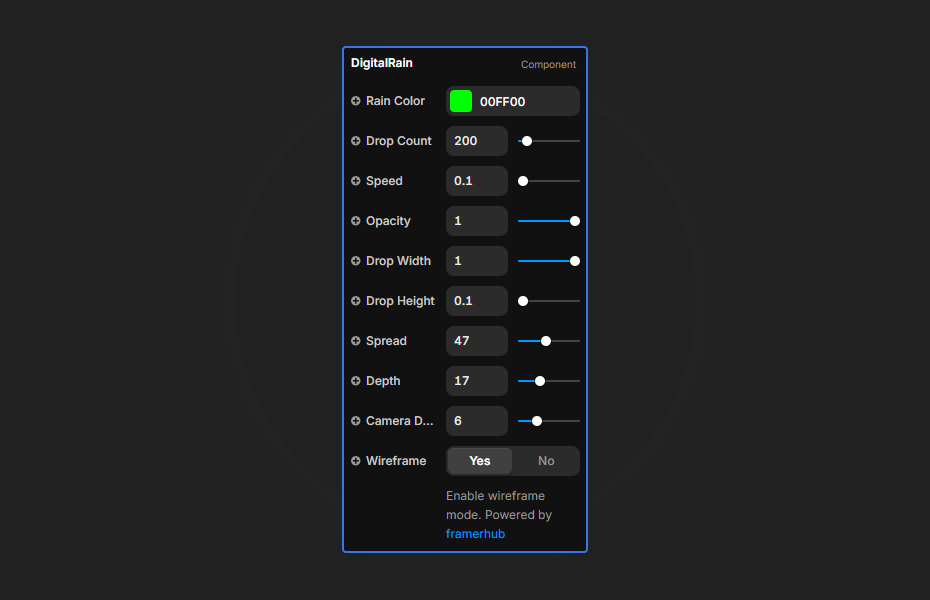
- Rain Color: color of the drops
- Opacity: how transparent the drops are
- Wireframe: wireframe rendering on or off
Geometry
- Drop Width and Drop Height: size and length of each bar
- Spread: horizontal area the drops cover
- Depth: Z-axis depth for parallax
Animation
- Speed: how fast the rain falls
- Drop Count: number of drops (50 to 2,000)
- Camera Distance: perspective depth
Starting settings
Classic. Bright green, 400 drops, speed 1, black section behind it.
Subtle depth. White drops at low opacity, 250 drops, speed 0.5, deep spread.
Storm. Cyan, 1,000 drops, speed 5 or more, camera close, for a short, energetic hero.
Performance and mobile
Use 200 to 500 drops on desktop and around 100 on phones. Dark backgrounds make bright drops stand out, so you rarely need more. Keep headlines as real text above the component for readability.
Compared with similar components
Matrix Rain shows the flat, classic rain of falling characters with your own character set. Random Letter Glitch fills a block with glitching letters. Rain Overlay is realistic water rain over photos. Choose Digital Rain when you want the Matrix idea with 3D depth.
How to install Digital Rain in Framer
- Purchase Digital Rain above
- Open your FramerHub dashboard
- Find Digital Rain in Recent Purchases and click "Copy URL"
- Open your Framer project
- Paste it anywhere on the canvas (Cmd/Ctrl + V)
License
Single-use license: use it in one client project with full commercial rights. No redistribution. 1 license = 1 client.
Questions before buying? Read the refund policy or email hello@framerhub.io.
Digital Rain FAQ
Does Digital Rain have a transparent background?
Yes. It supports full transparency, so the falling drops can sit over a dark section, a photo or a gradient.
How many drops should I use?
200 to 500 drops runs smoothly on most devices. On mobile, around 100 keeps the animation fluid. The maximum is 2,000.
Is it the same as the Matrix rain effect?
It is inspired by it, but Digital Rain is 3D: the drops fall at different depths with parallax, and the camera distance is adjustable. For flat falling characters, use Matrix Rain.
Can I change the color?
Yes. Rain Color sets the drop color and Opacity sets how see-through they are. Green, cyan and white stand out best on dark backgrounds.
Digital Rain - $9
A Matrix-inspired falling code effect with customizable colors, size, and 3D depth.
Trusted by agencies and freelancers
2,000+ Framer users rely on FramerHub plugins and components to build serious client sites.
"The Best Framer CMS Filtering Plugin I've Found — Truly a Game-Changer. I've tested a lot of Framer CMS filtering and sorting components — both free and paid — and this is by far the best one I've come across."
- Pierre Azalbert · CMS Filter
"Excellent product and super speedy and helpful support from the team!"
- Chloe Dovey · CMS Masonry Lightbox
"We had tried a couple of other Framer CMS filter components but they were buggy, hard to use and support was slow or non-existent. CMSFilter is easier to use and has a lot of added functionality."
- Mark Williamson · CMS Filter
"CMS Masonry-Lightbox is a super flexible and polished CMS grid that makes any portfolio shine. I especially love the support for local videos and the great customer support behind it."
- Rick van der Wal · CMS Masonry Lightbox
"I got a CMS featuring setup from Shahul Hameed, and it works perfectly. He was super helpful, guided me through everything, and even stayed up late to make sure I had no issues. Great experience overall!"
- Amarachi · CMS Filter
"Very happy with this purchase. Also the creators are very helpful, can only recommend."
- Petia Dimitrova · CMS Masonry Lightbox
"He really helped me out when I needed assistance adding it to my Framer project. Super fast customer support highly recommend!"
- Salman Abdulrazaq Ali
"Love the plugin, so glad you made it. … Thanks for building what Framer should have, you did a great job with it."
- Nathaniel DeSantis, Podcast Studio X · CMS Scheduler
"I updated the main CMS component in Framer and the bug is fixed now :) You are quick man! Love it."
- Marek · CMS Filter
"Amazing! This fixed the issue. Thanks so much for the help :)"
- Julie Elise Hauge · CMS Filter
Got questions? We've the answers
Got questions? We've the answers
Everything you need to know about FramerHub.